
Cloud Accounting vs Desktop Accounting: Which Solution Is Best for Your Business?
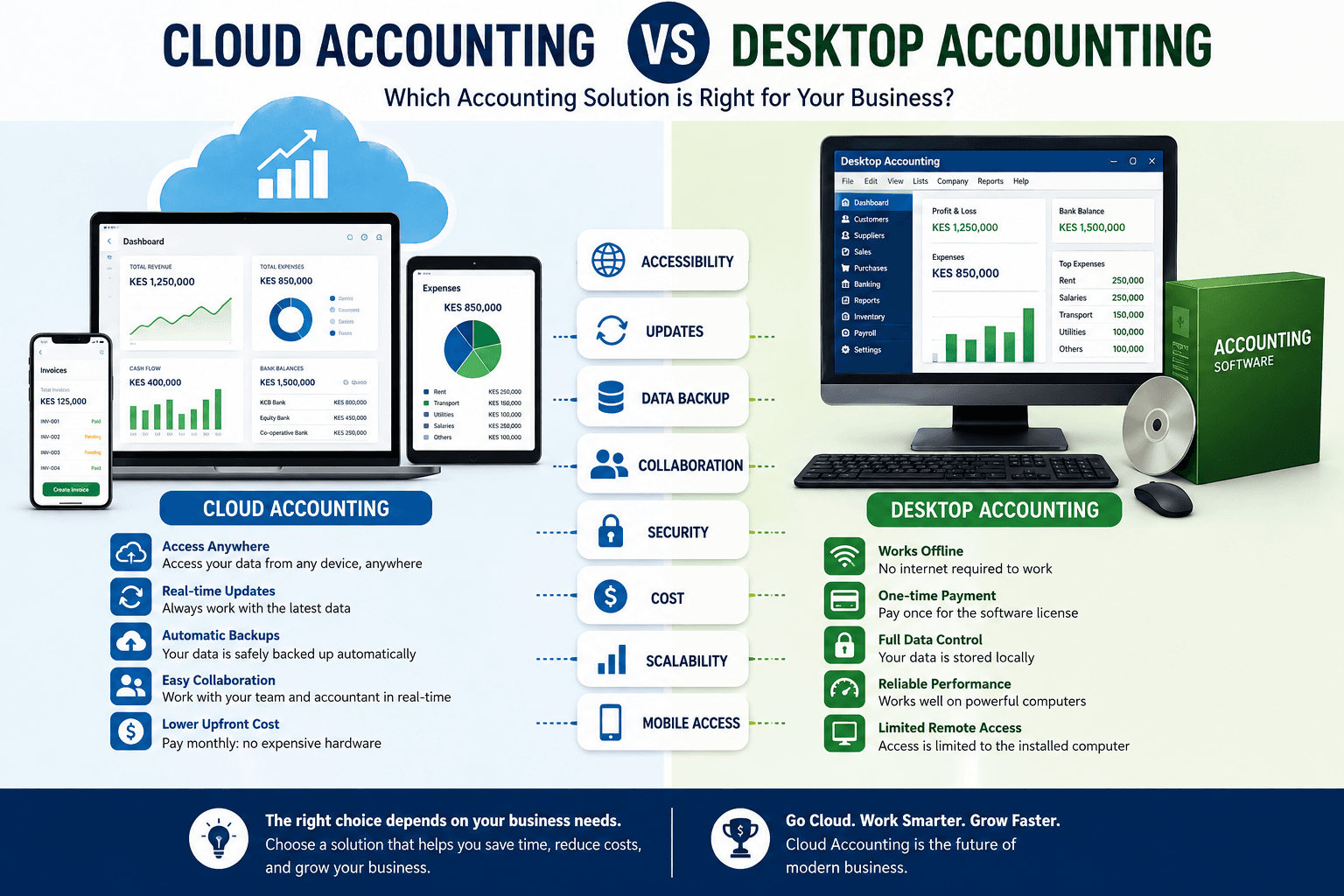
Choosing the right accounting system is one of the most important decisions any business owner can make. Whether you operate a startup, SME, or a large enterprise, your accounting software directly affects your financial reporting, tax compliance, cash flow management, and decision-making.
One of the biggest debates today is Cloud Accounting vs Desktop Accounting. Businesses across Kenya, Nigeria, South Africa, Zimbabwe, and many other countries are replacing traditional desktop accounting software with cloud-based solutions.
But is cloud accounting always the better option?
This comprehensive guide explores Cloud Accounting vs Desktop Accounting in detail, helping you determine which solution best fits your business.
Throughout this guide, we’ll examine features, benefits, disadvantages, pricing, security, performance, scalability, and future trends.
What Is Cloud Accounting?
Before comparing Cloud Accounting vs Desktop Accounting, it’s important to understand cloud accounting.
Cloud accounting refers to accounting software hosted online rather than installed on a local computer.
Users access the software through:
- Web browsers
- Mobile applications
- Tablets
- Laptops
- Desktop computers
The software provider manages:
- Updates
- Backups
- Security
- Server maintenance
- System upgrades
Examples include:
- Xero
- QuickBooks Online
- Zoho Books
- FreshBooks
- Sage Accounting
Cloud accounting allows business owners to access financial information from anywhere with an internet connection.
What Is Desktop Accounting?
Desktop accounting software is installed directly on a computer or local server.
Unlike cloud software, desktop accounting usually stores data locally.
Popular desktop accounting software includes:
- QuickBooks Desktop
- Sage 50
- TallyPrime
- Pastel Accounting
Many businesses have relied on desktop accounting software for decades because of its reliability and offline capabilities.
Understanding how desktop software works is essential when evaluating Cloud Accounting vs Desktop Accounting.
Why Businesses Compare Cloud Accounting vs Desktop Accounting
Businesses compare Cloud Accounting vs Desktop Accounting because accounting software influences nearly every financial process.
These include:
- Expense tracking
- Payroll
- Tax preparation
- Financial reporting
- Invoicing
- Budgeting
- Inventory management
- Cash flow analysis
Choosing the wrong platform can lead to:
- Slow reporting
- Data loss
- Security risks
- Higher operational costs
- Reduced productivity
Cloud Accounting vs Desktop Accounting: Main Differences
| Feature | Cloud Accounting | Desktop Accounting |
|---|---|---|
| Installation | Online | Installed locally |
| Accessibility | Anywhere | Specific computer |
| Updates | Automatic | Manual |
| Backup | Automatic | Manual |
| Collaboration | Excellent | Limited |
| Internet Required | Usually Yes | No |
| Initial Cost | Lower | Higher |
| Scalability | Excellent | Moderate |
| Security | Provider managed | User managed |
| Maintenance | Vendor | Business IT team |
This comparison gives a quick overview of Cloud Accounting vs Desktop Accounting.
Accessibility
One of the biggest differences in Cloud Accounting vs Desktop Accounting is accessibility.
Cloud accounting allows users to log in from:
- Home
- Office
- Client premises
- Airports
- Hotels
- Mobile devices
Business owners can monitor finances while traveling.
Desktop accounting typically restricts access to the installed computer unless expensive remote desktop solutions are implemented.
For businesses with remote teams, cloud accounting offers a significant advantage.
Cost Comparison
Cost is another major consideration in Cloud Accounting vs Desktop Accounting.
Cloud Accounting
Usually requires:
- Monthly subscription
- Annual subscription
- Minimal setup costs
- No server purchase
Desktop Accounting
Usually requires:
- Software license
- Server hardware
- IT support
- Upgrade purchases
- Backup systems
Although cloud accounting involves recurring payments, desktop accounting often incurs higher long-term maintenance costs.
Installation Process
Installation is another important factor in Cloud Accounting vs Desktop Accounting.
Cloud accounting requires almost no installation.
Simply:
- Create an account.
- Log in.
- Configure company settings.
- Begin using the software.
Desktop accounting requires:
- Software installation
- System configuration
- Database setup
- Local storage preparation
- Updates
Cloud deployment is generally faster and simpler.
Automatic Updates
Software updates improve:
- Security
- Performance
- Compliance
- Features
When evaluating Cloud Accounting vs Desktop Accounting, updates play a major role.
Cloud accounting updates automatically without disrupting users.
Desktop software often requires:
- Manual downloads
- Installation
- Technical support
- Downtime
Businesses using cloud solutions always have access to the latest features.
Data Backup
Data loss can be devastating.
This is another reason businesses evaluate Cloud Accounting vs Desktop Accounting carefully.
Cloud accounting automatically backs up:
- Transactions
- Invoices
- Reports
- Customer records
- Financial statements
Desktop accounting relies on manual backups.
If businesses forget to back up their data, they risk losing years of financial records.
Multi-User Collaboration
Modern businesses rely on collaboration.
Cloud accounting allows:
- Accountants
- Managers
- Auditors
- Business owners
- Finance teams
to work simultaneously.
Everyone accesses the same live database.
Desktop accounting often limits concurrent users unless expensive network licenses are purchased.
Collaboration is one of the strongest advantages in Cloud Accounting vs Desktop Accounting.
Security
Many businesses worry about security when discussing Cloud Accounting vs Desktop Accounting.
Cloud providers invest heavily in:
- Encryption
- Firewalls
- Multi-factor authentication
- Continuous monitoring
- Disaster recovery
Desktop accounting depends on the business’s own security measures.
Without proper antivirus software, backups, and IT management, desktop systems may be more vulnerable to hardware failures or ransomware.
Internet Dependency
Internet access is one of the few disadvantages of cloud accounting.
When comparing Cloud Accounting vs Desktop Accounting, this is often mentioned.
Cloud accounting generally requires internet access.
Desktop accounting works offline.
Businesses operating in areas with unreliable internet may still prefer desktop accounting.
However, internet connectivity continues to improve worldwide, making cloud accounting increasingly practical.
Scalability
As businesses grow, their accounting needs become more complex.
Cloud accounting easily supports:
- More users
- Additional branches
- Multiple currencies
- New integrations
- Higher transaction volumes
Desktop software often requires hardware upgrades and manual database expansion.
Scalability is a major advantage in Cloud Accounting vs Desktop Accounting.
Maintenance Requirements
Cloud accounting providers handle:
- Maintenance
- Software patches
- Infrastructure
- Performance optimization
Businesses simply log in and work.
Desktop accounting requires ongoing maintenance from internal IT staff or external consultants.
This increases operational costs over time.
Mobile Access
Modern business owners expect mobile access.
Cloud accounting provides dedicated mobile applications that allow users to:
- Approve invoices
- View dashboards
- Track expenses
- Send quotations
- Monitor cash flow
Desktop accounting usually lacks comprehensive mobile functionality.
This makes mobility another key consideration in Cloud Accounting vs Desktop Accounting.
Disaster Recovery
Unexpected events such as:
- Hardware failure
- Fire
- Flood
- Theft
- Cyberattacks
can destroy local computers.
Cloud accounting stores information in multiple secure data centers.
This improves disaster recovery significantly compared to traditional desktop systems.
For businesses concerned about continuity, this is an important advantage in Cloud Accounting vs Desktop Accounting.
Reporting Capabilities
Both cloud and desktop accounting systems provide financial reports such as:
- Profit and Loss Statements
- Balance Sheets
- Cash Flow Reports
- Tax Reports
- Expense Reports
However, cloud accounting often provides real-time dashboards that update instantly.
Desktop reports may require manual synchronization depending on the setup.
Cloud Accounting vs Desktop Accounting: Integrations
Modern businesses rarely use accounting software in isolation. Instead, they connect it with other business applications to improve efficiency. This is one of the biggest areas where Cloud Accounting vs Desktop Accounting differs.
Cloud accounting solutions integrate seamlessly with:
- CRM software
- Payroll systems
- Inventory management systems
- Point of Sale (POS) software
- Banking platforms
- E-commerce websites
- Tax filing systems
- Payment gateways
- Expense management tools
These integrations eliminate duplicate data entry and reduce human error.
Desktop accounting software can also integrate with other applications, but the process is often more complex. It may require additional licenses, manual imports, or custom development.
When evaluating Cloud Accounting vs Desktop Accounting, businesses that rely on multiple digital tools often find cloud solutions more flexible.
Performance and Speed
Performance is another factor in the Cloud Accounting vs Desktop Accounting debate.
Desktop accounting software generally performs very well on powerful computers because all processing happens locally. Large reports and complex calculations can sometimes run faster without depending on internet speed.
Cloud accounting, on the other hand, relies on internet connectivity and the provider’s servers. Leading cloud providers invest in high-performance infrastructure, making the experience smooth for most businesses.
For organizations with stable internet, the performance difference between Cloud Accounting vs Desktop Accounting is usually minimal.
Data Accuracy
Accurate financial records are essential for every business.
Cloud accounting improves data accuracy by:
- Synchronizing information in real time
- Reducing duplicate entries
- Automatically importing bank transactions
- Automating calculations
- Providing validation checks
Desktop accounting can also maintain accurate records, but manual imports and delayed updates increase the possibility of inconsistencies.
For businesses seeking fewer errors, Cloud Accounting vs Desktop Accounting often favors cloud-based systems.
Tax Compliance
Tax regulations continue to evolve across many countries.
Cloud accounting providers frequently release updates that reflect changes in:
- VAT rates
- Tax calculations
- Financial reporting standards
- Payroll regulations
- Compliance requirements
Businesses automatically receive these updates.
With desktop accounting, users may need to purchase updates or manually install new versions to remain compliant.
Tax compliance is therefore another important consideration in Cloud Accounting vs Desktop Accounting.
Multi-Branch Business Support
Companies operating several branches require centralized financial management.
Cloud accounting enables headquarters to monitor:
- Branch sales
- Expenses
- Inventory
- Cash flow
- Financial reports
All data is updated instantly.
Desktop accounting often requires separate databases or manual consolidation.
For growing organizations, Cloud Accounting vs Desktop Accounting clearly demonstrates the operational benefits of cloud technology.
Remote Work Capabilities
Remote work has become increasingly common.
Cloud accounting supports remote teams by allowing authorized users to access financial information securely from virtually anywhere.
Employees can:
- Process invoices
- Approve expenses
- Generate reports
- Review payments
- Manage accounts
Desktop accounting generally limits access to office computers unless remote access software is configured.
This makes remote work another area where Cloud Accounting vs Desktop Accounting highlights the strengths of cloud solutions.
Environmental Impact
Businesses are becoming more environmentally conscious.
Cloud accounting reduces paper usage by supporting:
- Digital invoices
- Electronic receipts
- Online approvals
- Digital reporting
- Electronic document storage
Desktop accounting can also support digital records, but many businesses continue printing reports due to local workflows.
Reducing paper consumption is another advantage when comparing Cloud Accounting vs Desktop Accounting.
Security Best Practices
Regardless of the platform chosen, businesses should follow security best practices.
These include:
- Strong passwords
- Multi-factor authentication
- Regular software updates
- Employee cybersecurity training
- Role-based access control
- Routine backups
- Antivirus protection
- Secure internet connections
Security should always remain a priority when implementing Cloud Accounting vs Desktop Accounting solutions.
Which Businesses Should Choose Cloud Accounting?
Cloud accounting is ideal for:
- Startups
- Small businesses
- Growing companies
- Retail businesses
- Service providers
- E-commerce stores
- Property management companies
- Logistics businesses
- Professional firms
- Organizations with remote teams
These businesses benefit from flexibility, scalability, and real-time access when choosing Cloud Accounting vs Desktop Accounting.
Which Businesses Should Choose Desktop Accounting?
Desktop accounting may still suit businesses that:
- Operate without reliable internet
- Have strict internal server policies
- Prefer one-time software purchases
- Require specialized legacy software
- Have very limited remote access needs
Although desktop systems remain useful in certain situations, many organizations are gradually transitioning to cloud platforms.
Common Myths About Cloud Accounting vs Desktop Accounting
Myth 1: Cloud accounting is not secure.
Reality: Leading providers use enterprise-grade encryption, secure data centers, and continuous monitoring that often exceed the security capabilities of many small businesses.
Myth 2: Desktop accounting is outdated.
Reality: Desktop accounting remains reliable for certain industries and businesses with specific operational needs.
Myth 3: Cloud accounting is expensive.
Reality: Subscription pricing often reduces upfront costs while eliminating expenses related to servers, maintenance, and manual upgrades.
Myth 4: Migration is difficult.
Reality: Many providers offer migration tools and professional support that simplify moving from desktop systems to cloud platforms.
Understanding these myths helps businesses make informed decisions about Cloud Accounting vs Desktop Accounting.
How to Migrate from Desktop Accounting to Cloud Accounting
If your business decides to move to the cloud, follow these steps:
- Review your current accounting processes.
- Back up all financial data.
- Choose a reputable cloud accounting provider.
- Clean and organize your financial records.
- Import historical data.
- Configure tax settings.
- Set user permissions.
- Integrate banking and payment systems.
- Train employees.
- Monitor the implementation and resolve any issues.
A structured migration plan minimizes disruption and ensures a smooth transition.
Real-World Example
Imagine a retail business with three branches.
Using desktop accounting:
- Each branch maintains separate records.
- Reports are consolidated manually.
- Managers wait for end-of-month updates.
- Collaboration is limited.
After moving to cloud accounting:
- Sales synchronize instantly.
- Financial reports update in real time.
- Managers access dashboards from anywhere.
- Accountants collaborate without exchanging files.
- Business owners make faster decisions based on current data.
This example demonstrates how Cloud Accounting vs Desktop Accounting affects daily operations.
Frequently Asked Questions
Is cloud accounting better than desktop accounting?
It depends on your business needs. Most growing businesses benefit from cloud accounting because of its accessibility, automatic updates, and scalability.
Can cloud accounting work offline?
Some cloud accounting platforms provide limited offline functionality, but internet access is generally required for full features.
Is desktop accounting still relevant?
Yes. Businesses with limited internet access or specialized legacy workflows may still prefer desktop accounting.
Which option is more secure?
Both can be secure when properly managed. However, reputable cloud providers typically invest heavily in security infrastructure.
Can I switch from desktop accounting to cloud accounting?
Yes. Most modern cloud accounting platforms provide migration tools and professional support to help businesses transition smoothly.
Key Takeaways
Choosing between Cloud Accounting vs Desktop Accounting depends on your business size, budget, operational model, and future growth plans.
Cloud accounting offers:
- Anywhere access
- Automatic updates
- Real-time collaboration
- Easy integrations
- Lower infrastructure requirements
- Greater scalability
Desktop accounting offers:
- Offline functionality
- Local data control
- Strong performance on dedicated machines
- Familiar workflows for some long-established businesses
As digital transformation accelerates, cloud accounting continues to gain popularity because it supports modern business operations, remote work, and data-driven decision-making.
For organizations planning long-term growth, comparing Cloud Accounting vs Desktop Accounting carefully will help ensure they invest in an accounting solution that supports efficiency, compliance, and future expansion.
Future Trends in Cloud Accounting vs Desktop Accounting
Technology is changing rapidly, and accounting software is evolving with it. Businesses that understand these trends can make better long-term investments. The discussion around Cloud Accounting vs Desktop Accounting is no longer just about where data is stored—it is about which platform can support innovation and future business growth.
Artificial Intelligence (AI)
Artificial Intelligence is transforming accounting by automating repetitive tasks. Modern cloud accounting platforms are increasingly using AI to:
- Categorize transactions automatically
- Detect unusual spending patterns
- Predict cash flow
- Generate financial insights
- Reduce manual bookkeeping errors
While some desktop accounting applications are beginning to adopt AI features, cloud platforms receive these innovations faster through automatic updates. This makes Cloud Accounting vs Desktop Accounting an important consideration for businesses looking to benefit from AI-powered financial management.
Automation Will Continue to Grow
Automation reduces the time spent on repetitive accounting tasks.
Cloud accounting can automate:
- Invoice creation
- Recurring billing
- Payment reminders
- Expense tracking
- Bank reconciliation
- Financial reporting
- Tax calculations
Desktop accounting can also automate certain processes, but adding new automation features often requires software upgrades or third-party tools.
Businesses comparing Cloud Accounting vs Desktop Accounting should consider how automation can improve productivity and reduce operational costs.
Real-Time Financial Insights
Business owners no longer want to wait until the end of the month to review financial performance.
Cloud accounting provides dashboards that display:
- Revenue
- Expenses
- Profit margins
- Outstanding invoices
- Cash flow
- Bank balances
These insights help managers make faster and more informed decisions.
Desktop accounting typically requires manual report generation, making real-time visibility more limited. This is another reason why Cloud Accounting vs Desktop Accounting increasingly favors cloud-based solutions.
Stronger Cybersecurity
Cybersecurity remains a priority for every organization.
Future cloud accounting platforms are expected to introduce:
- Advanced encryption
- AI-powered fraud detection
- Continuous threat monitoring
- Enhanced identity verification
- Improved access controls
Desktop accounting software will also improve security, but businesses will remain responsible for implementing and maintaining many protective measures themselves.
As cyber threats evolve, Cloud Accounting vs Desktop Accounting will continue to focus heavily on protecting sensitive financial information.
Better Mobile Experiences
Mobile technology is becoming essential for modern businesses.
Future cloud accounting applications will allow users to:
- Approve payments instantly
- Capture receipts using smartphones
- Monitor business performance in real time
- Send invoices from mobile devices
- Receive financial alerts
Desktop accounting generally cannot match this level of mobile accessibility, making mobility another factor in Cloud Accounting vs Desktop Accounting.
Industry-Specific Solutions
Accounting software is becoming more specialized.
Cloud providers are developing solutions tailored for industries such as:
- Construction
- Hospitality
- Retail
- Healthcare
- Logistics
- Manufacturing
- Real estate
- Professional services
Industry-specific features improve efficiency and reduce the need for custom development.
Businesses evaluating Cloud Accounting vs Desktop Accounting should consider whether specialized cloud solutions better match their operational requirements.
Final Verdict: Cloud Accounting vs Desktop Accounting
There is no universal answer to the Cloud Accounting vs Desktop Accounting debate because every business has unique needs.
Choose cloud accounting if your business values:
- Remote access
- Automatic updates
- Easy collaboration
- Scalability
- Integration with other business software
- Lower IT maintenance
- Real-time reporting
Choose desktop accounting if your business requires:
- Offline functionality
- Local control of financial data
- Existing legacy accounting systems
- Minimal dependence on internet connectivity
For many modern businesses, cloud accounting offers greater flexibility, improved collaboration, and easier scalability. However, desktop accounting still has a place in organizations with specialized operational requirements.
The most important step is to assess your current needs while also considering your future growth plans. Selecting the right accounting solution today can improve financial accuracy, streamline operations, and position your business for long-term success.
Conclusion
As businesses embrace digital transformation, the comparison of Cloud Accounting vs Desktop Accounting becomes increasingly relevant. Choosing the right accounting platform affects efficiency, security, compliance, collaboration, and long-term growth.
When evaluating Cloud Accounting vs Desktop Accounting, consider factors such as accessibility, cost, scalability, automation, security, integrations, and future business needs. Cloud accounting delivers exceptional flexibility, automatic updates, real-time reporting, and seamless collaboration, making it an excellent choice for growing organizations. Desktop accounting remains valuable for businesses that require offline access, local data control, or rely on established legacy systems.
Ultimately, the best choice depends on your business objectives, budget, and operational environment. By carefully comparing Cloud Accounting vs Desktop Accounting, you can invest in an accounting solution that supports better financial management today while preparing your organization for the opportunities of tomorrow.