
Table of Contents
ToggleCloud Software vs On-Premise Software: Which Solution Is Right for Your Business?
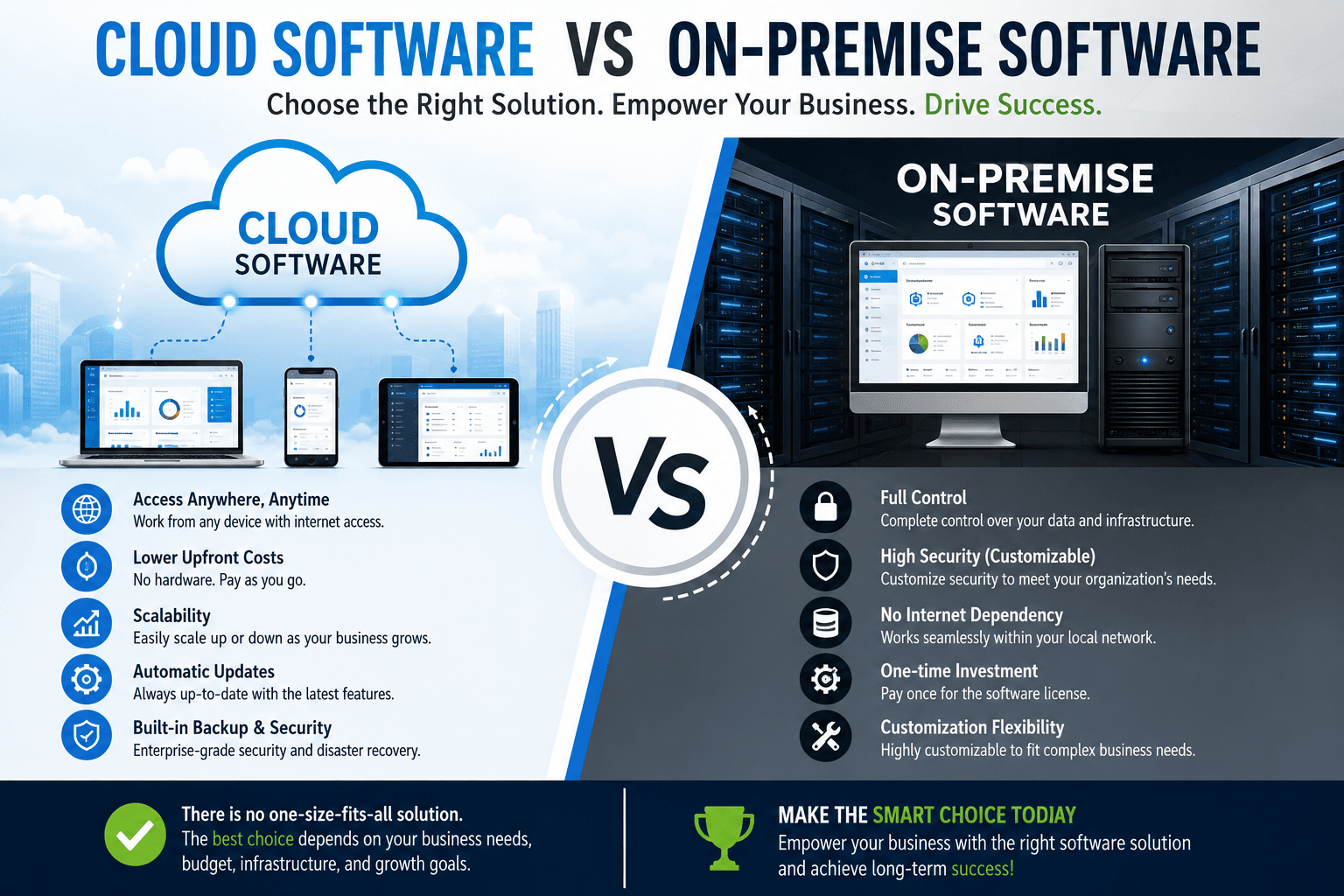
In today’s digital economy, every business depends on technology to manage operations, customers, employees, finances, and communication. One of the most important technology decisions organizations face is choosing between Cloud Software vs On-Premise Software.
Whether you are a startup in Nairobi, a manufacturing company in Thika, a SACCO in Kisumu, a hospital in Mombasa, or a government institution anywhere in Kenya, selecting the right software deployment model can significantly affect your productivity, costs, cybersecurity, and long-term growth.
The debate around Cloud Software vs On-Premise Software is no longer just about where your software is installed. It is about flexibility, business continuity, security, innovation, compliance, and digital transformation.
This comprehensive guide explains everything you need to know about Cloud Software vs On-Premise Software, helping you make an informed investment decision.
What is Cloud Software?
Cloud software, also called Software as a Service (SaaS), is software hosted on remote servers and accessed through the internet.
Instead of installing applications on your office computers, users log in securely through browsers or mobile apps.
Examples include:
- CRM systems
- ERP software
- HR Management Systems
- Payroll software
- Help Desk software
- Property Management Systems
- Accounting software
- Customer Support Platforms
- Project Management Software
The software provider manages:
- Hosting
- Updates
- Security patches
- Server maintenance
- Backups
- Disaster recovery
This allows businesses to focus on operations rather than IT infrastructure.
What is On-Premise Software?
On-premise software is installed directly on an organization’s own servers and computers.
The company owns and manages:
- Servers
- Storage
- Databases
- Security
- Updates
- Networking
- Maintenance
- Disaster recovery
Traditionally, large organizations preferred on-premise software because it offered greater infrastructure control.
Understanding Cloud Software vs On-Premise Software
When comparing Cloud Software vs On-Premise Software, there is no one-size-fits-all answer.
Each deployment model has strengths and weaknesses depending on:
- Company size
- Budget
- Security requirements
- Compliance regulations
- Internet reliability
- IT expertise
- Growth plans
Let’s examine every aspect in detail.
Infrastructure Comparison
| Cloud Software | On-Premise Software |
|---|---|
| Hosted remotely | Hosted internally |
| Internet access | Local network |
| Vendor manages servers | Company manages servers |
| Subscription model | Capital investment |
| Automatic updates | Manual updates |
| Easy scalability | Hardware upgrades required |
Cost Comparison
One of the biggest considerations in Cloud Software vs On-Premise Software is cost.
Cloud Software Costs
Typically includes:
- Monthly subscription
- Annual licensing
- User-based pricing
- Storage fees
- Premium support
Advantages include:
- No server purchase
- No expensive infrastructure
- Lower startup costs
- Predictable monthly expenses
On-Premise Costs
Requires:
- Servers
- Networking equipment
- Backup systems
- Power infrastructure
- IT personnel
- Security hardware
- Software licenses
While the initial investment is high, long-term ownership may reduce recurring subscription expenses for some organizations.
Implementation Speed
Cloud software wins significantly here.
Cloud
Deployment can take:
- Hours
- Days
- A few weeks
depending on customization.
On-Premise
Implementation may require:
- Hardware procurement
- Installation
- Configuration
- Networking
- Security setup
- Server rooms
This often takes weeks or months.
Accessibility
Cloud software enables users to work from anywhere.
Employees can access systems using:
- Laptop
- Mobile phone
- Tablet
- Home office
- Branch offices
On-premise software generally requires:
- Office network
- VPN access
- Dedicated infrastructure
Remote work becomes more complicated.
Scalability
Growing businesses need software that grows with them.
Cloud solutions make it easy to:
- Add users
- Increase storage
- Upgrade features
- Expand locations
On-premise systems require:
- New servers
- Hardware upgrades
- Storage expansion
- IT reconfiguration
Maintenance
Cloud vendors handle:
- Software updates
- Security patches
- Infrastructure maintenance
- Monitoring
- Performance optimization
On-premise systems require internal IT teams to perform these tasks.
Security Comparison
Security is one of the most debated aspects of Cloud Software vs On-Premise Software.
Cloud Security
Modern cloud providers invest millions in:
- Encryption
- Firewalls
- Intrusion detection
- Threat monitoring
- Compliance certifications
- Multi-factor authentication
Many cloud providers maintain security levels beyond what small and medium businesses can afford internally.
On-Premise Security
Organizations control:
- Firewalls
- Servers
- Access
- Backups
- Physical security
This offers maximum control but also places all responsibility on the organization.
Data Backup
Cloud Software
✔ Automatic backups
✔ Redundant servers
✔ Disaster recovery
✔ Geographic redundancy
On-Premise
Requires:
- Backup servers
- External drives
- Backup software
- Offsite storage
- Disaster recovery planning
Internet Dependency
Cloud software depends on internet connectivity.
If internet access is interrupted:
- Access may be limited
- Productivity may reduce
On-premise software continues operating inside the local network.
However, Kenya’s improving fibre and 4G/5G connectivity has made cloud adoption increasingly practical.
Performance
Cloud software performance depends on:
- Internet speed
- Provider infrastructure
- Network latency
On-premise performance depends on:
- Internal hardware
- Server specifications
- Local network
Compliance
Industries with strict regulations may require:
- Local data storage
- Specific audit controls
- Customized security policies
Cloud providers increasingly support regulatory compliance through configurable hosting options and certifications, while on-premise deployments allow organizations to tailor controls directly to internal policies.
Customization
On-premise software often allows deeper customization because organizations have full control over the environment.
Cloud software can also be customized, though the extent depends on the platform and vendor. Modern cloud applications frequently offer APIs, integrations, and configurable workflows without requiring changes to the core application.
Business Continuity
Cloud providers typically include:
- Automatic failover
- High availability
- Geographic redundancy
- Continuous backups
On-premise disaster recovery requires:
- Secondary data centers
- Backup servers
- Recovery testing
Comparison Table
| Feature | Cloud | On-Premise |
|---|---|---|
| Initial Cost | Low | High |
| Maintenance | Vendor | Customer |
| Scalability | Excellent | Moderate |
| Updates | Automatic | Manual |
| Accessibility | Anywhere | Usually Local |
| Backup | Automatic | Manual |
| Deployment | Fast | Slower |
| Hardware | Not Required | Required |
| IT Staff | Minimal | Extensive |
| Disaster Recovery | Built-in | Self-managed |
Best Industries for Cloud Software
Cloud software is well suited to:
- Retail businesses
- Schools
- Universities
- Hospitals
- Hotels
- Property management companies
- SACCOs
- NGOs
- Manufacturing firms
- Logistics companies
- Professional services
Best Industries for On-Premise Software
On-premise software may be preferred by organizations that:
- Require complete control of infrastructure
- Operate in environments with limited internet access
- Have substantial in-house IT teams
- Need specialized integrations with legacy systems
- Maintain strict internal policies around data hosting
Case Study 1: Property Management Company in Nairobi
A medium-sized property management company overseeing more than 2,000 rental units relied on an on-premise rent management system.
Challenges:
- Costly server maintenance
- Limited remote access
- Manual backups
- Downtime during power outages
After migrating to a cloud-based property management platform, the company experienced:
- 99.9% system availability
- Faster rent collection reconciliation
- Secure remote access for property managers
- Reduced infrastructure costs
- Easier software updates
The transition also enabled tenants to receive automated payment reminders and digital receipts, improving the overall customer experience.
Case Study 2: Manufacturing Company
A manufacturing firm with several production sites had invested heavily in local infrastructure for production planning and inventory management.
Because its production environment required close integration with specialized factory equipment and experienced occasional internet limitations, the company retained an on-premise deployment while modernizing selected business functions.
Results:
- Stable production operations
- High performance within the local network
- Strong control over operational systems
- Gradual adoption of cloud services for collaboration and reporting
This hybrid approach allowed the business to benefit from both deployment models.
Customer Testimonials
★★★★★ James M., Property Manager
“We moved from an on-premise solution to cloud software and immediately noticed improved accessibility. Our managers can now monitor properties from anywhere.”
★★★★★ Grace W., HR Director
“Automatic updates eliminated the maintenance headaches we previously faced. Our HR team now focuses on employees rather than software issues.”
★★★★★ Peter K., Finance Manager
“The cloud solution significantly reduced our infrastructure costs while improving system reliability and backup capabilities.”
Service Description
Our software development team helps organizations evaluate and implement the right technology strategy based on their operational needs and growth objectives.
Our services include:
- Cloud software development
- Custom business software
- ERP implementation
- CRM development
- HR and payroll systems
- Property management software
- Rent collection platforms
- Help desk solutions
- Customer relationship management
- Mobile application development
- API integrations
- Data migration
- Legacy system modernization
- Cloud migration planning
- Ongoing maintenance and support
Whether you choose a cloud, on-premise, or hybrid architecture, we work with you to design a secure, scalable, and future-ready solution.
Cloud Software vs On-Premise Software: Total Cost of Ownership (TCO)
When businesses compare Cloud Software vs On-Premise Software, many focus only on the initial purchase price. However, the real financial picture is the Total Cost of Ownership (TCO) over five to ten years.
Cloud Software Costs
Cloud software typically includes:
- Monthly or annual subscription fees
- User licenses
- Premium support (optional)
- Additional storage
- Advanced features
- API usage (for some platforms)
Although these are recurring costs, they eliminate many hidden expenses associated with maintaining physical infrastructure.
On-Premise Software Costs
An on-premise solution often requires:
- Server hardware
- Database licenses
- Operating system licenses
- Server room setup
- Cooling systems
- Backup hardware
- UPS and power redundancy
- IT administrators
- Cybersecurity tools
- Annual maintenance
Many organizations underestimate these ongoing costs. Over several years, hardware replacements, software upgrades, and IT staffing can significantly increase the total investment.
Cloud Software vs On-Premise Software for Small Businesses
Small businesses often have limited budgets and lean IT teams. Cloud software is usually an attractive option because it reduces the need for expensive infrastructure while allowing teams to focus on serving customers.
Benefits include:
- Lower startup costs
- Quick implementation
- Easy user management
- Automatic updates
- Access from anywhere
- Simplified collaboration
Examples include:
- Small accounting firms
- Law firms
- Retail shops
- Property agencies
- Startups
- Healthcare clinics
Cloud Software vs On-Premise Software for Large Enterprises
Large enterprises often manage:
- Thousands of employees
- Multiple branches
- High transaction volumes
- Sensitive customer information
These organizations may choose:
- Fully cloud-based solutions
- Fully on-premise systems
- Hybrid deployments
A hybrid model is becoming increasingly common because it balances flexibility with operational requirements.
Hybrid Software: The Best of Both Worlds
A hybrid deployment combines cloud services with on-premise infrastructure.
For example:
- Payroll remains on internal servers.
- Customer Relationship Management (CRM) operates in the cloud.
- Email is cloud-based.
- Manufacturing systems remain on-site.
- Document storage is cloud-enabled.
This approach enables businesses to modernize gradually while protecting existing investments.
Advantages of Hybrid Systems
- Greater flexibility
- Reduced migration risk
- Improved disaster recovery
- Better scalability
- Easier integration with legacy systems
- Phased modernization
Internet Reliability and Business Operations
One common concern when discussing Cloud Software vs On-Premise Software is internet reliability.
Modern cloud platforms are designed to work efficiently over standard broadband connections, and many support mobile access. Businesses can also improve resilience by:
- Using multiple internet providers
- Installing automatic failover connections
- Implementing secure VPN access where needed
As internet infrastructure continues to improve across Kenya, cloud adoption becomes increasingly practical for organizations of all sizes.
Disaster Recovery Comparison
Unexpected events such as hardware failures, cyberattacks, power outages, or natural disasters can disrupt business operations.
Cloud Disaster Recovery
Cloud providers generally include:
- Automated backups
- Geographic redundancy
- High availability
- Continuous monitoring
- Rapid recovery options
On-Premise Disaster Recovery
Organizations must plan and maintain:
- Backup servers
- Off-site backups
- Recovery procedures
- Regular disaster recovery testing
- Replacement hardware
A well-designed disaster recovery strategy is essential regardless of the deployment model.
Environmental Impact
Cloud infrastructure can help organizations reduce their environmental footprint by consolidating computing resources into highly efficient data centers.
Potential benefits include:
- Lower electricity consumption within offices
- Reduced demand for on-site server rooms
- Fewer hardware replacements
- Improved energy efficiency
On-premise environments, by contrast, require local servers that consume power and may need dedicated cooling systems.
Software Updates and Innovation
Keeping software current is vital for security and performance.
Cloud Software
Most cloud applications provide:
- Automatic updates
- New features without manual installation
- Security improvements
- Performance enhancements
- Minimal disruption to users
On-Premise Software
Updates generally require:
- Testing
- Scheduling downtime
- Installation by IT staff
- Compatibility verification
Organizations may postpone updates, increasing operational and security risks.
Data Analytics and Business Intelligence
Modern software increasingly includes dashboards, reports, and analytics that help leaders make informed decisions.
Cloud platforms often make it easier to:
- Access real-time dashboards
- Share reports across teams
- Integrate with business intelligence tools
- Scale analytics as data grows
On-premise systems can also provide advanced analytics but may require additional infrastructure and configuration.
Cloud Software vs On-Premise Software in Different Industries
Healthcare
Healthcare providers benefit from electronic medical records, appointment scheduling, billing, and reporting. The appropriate deployment depends on operational, security, and regulatory requirements.
Education
Schools and universities often prefer cloud platforms because they support online learning, collaboration, and access from multiple campuses.
Real Estate
Property managers use cloud systems to manage rent collection, maintenance requests, tenant communication, and financial reporting from anywhere.
Manufacturing
Manufacturers may combine on-premise production systems with cloud-based reporting and collaboration tools.
Retail
Retail businesses benefit from cloud-enabled inventory management, point-of-sale integration, and centralized reporting across branches.
Common Myths About Cloud Software vs On-Premise Software
Myth 1: Cloud Software Is Not Secure
Modern cloud providers invest heavily in cybersecurity, encryption, identity management, and continuous monitoring. Security depends on proper configuration and operational practices, regardless of deployment model.
Myth 2: On-Premise Software Never Fails
Local servers can experience hardware failures, power outages, storage issues, and human error. Proper maintenance and backups are still essential.
Myth 3: Cloud Software Is Always Cheaper
While cloud software often reduces upfront costs, long-term subscription fees should be evaluated alongside operational benefits and maintenance savings.
Myth 4: On-Premise Software Cannot Scale
On-premise environments can scale, but doing so usually requires purchasing additional hardware and investing in infrastructure upgrades.
Migration Checklist
If your organization is considering moving from on-premise to cloud software, use this checklist:
- Evaluate existing applications
- Audit current hardware
- Review security requirements
- Identify critical business processes
- Clean and organize data
- Develop a migration plan
- Train employees
- Test integrations
- Establish backup procedures
- Monitor performance after deployment
Signs It’s Time to Move to Cloud Software
Your organization may be ready for cloud software if:
- Employees frequently work remotely.
- Server maintenance costs are increasing.
- Hardware is reaching end of life.
- You need to support multiple branches.
- Software updates are difficult to manage.
- Your business is growing rapidly.
- You require better disaster recovery.
- Collaboration between teams is challenging.
Additional Success Story
Financial Services Company
A growing financial services company operating across Kenya struggled with maintaining several aging on-premise servers. System updates required weekend maintenance, and staff working outside the head office had limited access.
After implementing a cloud-based business management platform, the company achieved:
- Faster deployment of new features
- Improved collaboration between branches
- Reduced infrastructure maintenance
- Enhanced reporting for management
- Better support for remote and mobile employees
Management reported improved operational efficiency and greater confidence in business continuity planning.
Why Choose Zama Experts?
At Zama Experts, we help organizations make informed technology decisions based on their operational needs rather than a one-size-fits-all approach.
Our expertise includes:
- Cloud-native application development
- On-premise enterprise software
- Hybrid architecture design
- Software modernization
- Legacy system migration
- Business process automation
- Cybersecurity best practices
- API and third-party integrations
- Technical support and maintenance
- Staff training and change management
We work with startups, SMEs, NGOs, educational institutions, healthcare providers, real estate companies, and large enterprises across Kenya to deliver scalable, secure, and reliable software solutions that support long-term business growth.
Frequently Asked Questions
Which is more secure: cloud or on-premise software?
Both can be highly secure when implemented correctly. Cloud providers invest heavily in security technologies, while on-premise environments allow organizations to manage security directly.
Which option is less expensive?
Cloud software generally requires lower upfront investment and predictable subscription costs. On-premise software often involves higher initial capital expenditure for hardware and infrastructure.
Can businesses migrate from on-premise to cloud?
Yes. Many organizations successfully migrate their applications and data using phased migration strategies that minimize downtime.
Is cloud software suitable for SMEs?
Yes. Cloud solutions are especially attractive for small and medium-sized businesses because they reduce infrastructure costs and simplify maintenance.
Can I combine cloud and on-premise systems?
Absolutely. Hybrid deployments allow organizations to keep certain applications on-premise while using cloud services for others, offering flexibility and business continuity.
The Future of Business Software
Organizations are increasingly adopting hybrid and cloud-first strategies to support:
- Remote work
- Mobile access
- Artificial intelligence
- Real-time analytics
- Automation
- Collaboration
- Digital customer experiences
As connectivity continues to improve across Kenya, cloud platforms are becoming an attractive option for many organizations, while on-premise solutions remain valuable where specific operational or regulatory requirements exist.
Conclusion
Choosing between Cloud Software vs On-Premise Software is one of the most important technology decisions your business will make. Understanding the differences between Cloud Software vs On-Premise Software allows organizations to invest in a solution that aligns with their operational needs, budget, security requirements, and long-term growth strategy. Whether you are a startup, SME, or large enterprise, evaluating Cloud Software vs On-Premise Software carefully will help you maximize productivity and future-proof your business.
As digital transformation continues to reshape industries, the debate around Cloud Software vs On-Premise Software is becoming increasingly relevant. Cloud solutions provide flexibility, remote accessibility, automatic updates, scalability, and predictable costs, while on-premise solutions offer greater infrastructure control, deep customization, and local data management. The right choice in Cloud Software vs On-Premise Software depends on your organization’s priorities and business objectives.
For many businesses, Cloud Software vs On-Premise Software is no longer an either-or decision. Hybrid environments combine the strengths of both deployment models, enabling organizations to modernize operations while maintaining critical systems where they are most effective. By thoroughly comparing Cloud Software vs On-Premise Software, businesses can create a technology roadmap that supports innovation, resilience, and sustainable growth.
Before making your final decision on Cloud Software vs On-Premise Software, assess your current infrastructure, workforce, compliance requirements, future expansion plans, and IT capabilities. Investing time in evaluating Cloud Software vs On-Premise Software today can save significant costs and operational challenges in the future while ensuring your software continues to support your evolving business needs.
If you are looking for expert guidance on Cloud Software vs On-Premise Software, Zama Experts is ready to help. Our experienced software consultants design, develop, and implement cloud, on-premise, and hybrid business solutions tailored to your unique requirements. We help organizations evaluate Cloud Software vs On-Premise Software, migrate existing systems, improve cybersecurity, integrate business applications, and optimize overall performance. Contact Zama Experts today on 0725 345 345 to discover how the right Cloud Software vs On-Premise Software strategy can increase efficiency, reduce costs, improve security, accelerate innovation, and position your organization for long-term success.
Call to Action
Ready to determine whether Cloud Software vs On-Premise Software is the right fit for your business?
Our experienced team designs, develops, and implements secure, scalable software solutions tailored to your organization. Whether you need a cloud-based platform, an on-premise enterprise application, or a hybrid solution, we can help you modernize your operations and improve efficiency.
Contact Zama Experts today:
📞 0725 345 345
Our services include:
- Custom Software Development
- Cloud Migration
- ERP & CRM Solutions
- Property Management Systems
- HR & Payroll Software
- Help Desk & Customer Support Platforms
- Mobile App Development
- API Integrations
- Ongoing Technical Support
Partner with Zama Experts to build reliable, future-ready software that supports your business today and scales with your success tomorrow.