
SaaS vs Licensed Software: Which Solution Is Best for Your Business?
What Is SaaS?
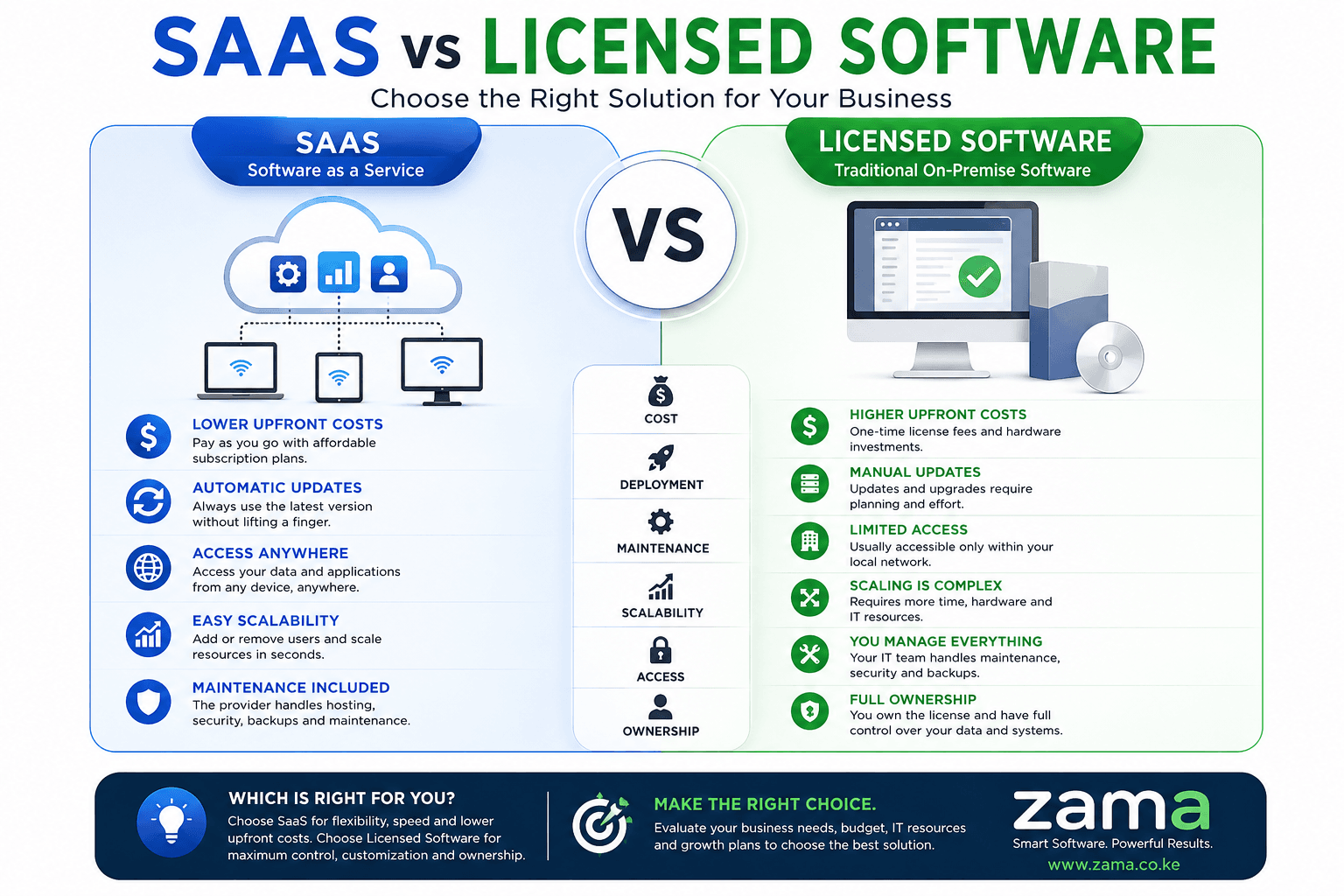
When discussing SaaS vs Licensed Software, it is important to understand what Software as a Service (SaaS) actually means. SaaS is a cloud-based software delivery model where users access applications through the internet instead of installing them on local computers or company servers. The software is hosted by the provider, who is responsible for maintenance, updates, security, and infrastructure.
Businesses subscribe to the software by paying monthly or annual fees. This subscription model allows organizations to access enterprise-grade solutions without making a large upfront investment.
Examples of SaaS applications include:
- Customer Relationship Management (CRM)
- Enterprise Resource Planning (ERP)
- Accounting Software
- Human Resource Management Systems
- Property Management Software
- Help Desk Software
- Inventory Management Systems
- WhatsApp Business Platforms
- Email Marketing Tools
- Project Management Software
The discussion around SaaS vs Licensed Software often begins with accessibility. SaaS applications are accessible from anywhere with an internet connection, making them ideal for businesses with remote teams or multiple branches.
Advantages of SaaS
Lower Initial Costs
Instead of purchasing expensive licenses, businesses only pay subscription fees. This reduces capital expenditure and improves cash flow.
Automatic Updates
Software providers continuously improve their applications. Updates happen automatically without requiring IT intervention.
Easy Deployment
Implementation takes days rather than months. Employees simply log in through a web browser.
High Scalability
Organizations can easily add or remove users as the business grows.
Better Collaboration
Employees working from different locations can access the same data simultaneously.
Understanding these advantages is essential when comparing SaaS vs Licensed Software, especially for growing businesses.
What Is Licensed Software?
Licensed software, sometimes referred to as on-premise software, is installed directly onto company computers or servers. Businesses purchase licenses that grant them the right to use the software according to specific terms.
Unlike SaaS, licensed software generally requires a larger upfront investment but may involve fewer recurring subscription costs.
Examples include:
- Traditional ERP systems
- Desktop accounting software
- Manufacturing systems
- CAD software
- Specialized engineering software
- Hospital management applications
- Government information systems
The debate surrounding SaaS vs Licensed Software often centers on ownership and control. Licensed software provides businesses with greater control over their infrastructure and data.
Advantages of Licensed Software
Complete Control
Organizations decide when to install updates and configure their systems according to internal requirements.
Offline Access
Many licensed applications continue functioning without an internet connection.
Greater Customization
Companies can modify software extensively to match unique business processes.
Data Residency
Sensitive information remains within company-controlled infrastructure.
Long-Term Ownership
Some perpetual licenses allow businesses to continue using the software indefinitely without recurring subscription payments.
Understanding these strengths helps organizations make informed SaaS vs Licensed Software decisions.
SaaS vs Licensed Software: Major Differences
The comparison between SaaS vs Licensed Software becomes clearer when examining core business factors.
| Feature | SaaS | Licensed Software |
|---|---|---|
| Installation | Cloud-based | Local installation |
| Payment | Monthly or annual subscription | One-time purchase plus maintenance |
| Updates | Automatic | Manual |
| Maintenance | Vendor-managed | Company-managed |
| Accessibility | Anywhere with internet | Usually office network |
| Scalability | Easy | More complex |
| Infrastructure | Provider hosts servers | Company hosts servers |
| Deployment | Fast | Longer implementation |
| Backup | Vendor handles backups | Business manages backups |
| IT Requirements | Minimal | Higher |
This table highlights the practical differences in the SaaS vs Licensed Software comparison.
SaaS vs Licensed Software: Cost Comparison
Cost is one of the biggest deciding factors.
SaaS Costs
With SaaS, organizations avoid:
- Server purchases
- Expensive infrastructure
- Large licensing fees
- Upgrade costs
- Maintenance contracts
Instead, they pay predictable monthly or annual subscription fees.
This predictable pricing is one reason many SMEs choose SaaS vs Licensed Software solutions.
Example
A company with 30 employees may pay:
- Monthly subscription
- Cloud hosting included
- Security included
- Support included
- Automatic updates included
No dedicated IT infrastructure is necessary.
Licensed Software Costs
Licensed software usually requires:
- Initial software purchase
- Database licenses
- Server hardware
- IT personnel
- Backup systems
- Security solutions
- Annual maintenance contracts
Although upfront costs are higher, some organizations prefer this model because they own the software license.
When evaluating SaaS vs Licensed Software, businesses should calculate the total cost of ownership over five to ten years rather than focusing only on initial expenses.
SaaS vs Licensed Software: Deployment Speed
Deployment speed can significantly affect business operations.
SaaS Deployment
Implementation often involves:
- Account creation
- User setup
- Configuration
- Data import
- Staff training
Many SaaS solutions can be operational within a few days.
Licensed Software Deployment
Implementation generally requires:
- Purchasing hardware
- Installing servers
- Installing databases
- Software configuration
- Security setup
- Network configuration
- User testing
Projects may take weeks or even months.
This is another area where SaaS vs Licensed Software presents a clear distinction.
SaaS vs Licensed Software: Maintenance
Maintenance responsibilities differ significantly.
SaaS
The vendor handles:
- Bug fixes
- Software updates
- Infrastructure monitoring
- Security patches
- Server maintenance
- Database optimization
Businesses can focus on their operations instead of technical management.
Licensed Software
The organization is responsible for:
- Server health
- Software upgrades
- Database management
- Security patches
- Disaster recovery
- Performance tuning
These responsibilities require skilled IT personnel.
Maintenance requirements are therefore a major consideration in the SaaS vs Licensed Software decision-making process.
SaaS vs Licensed Software: Security
Security is often a top concern when choosing business software.
SaaS Security
Leading SaaS providers invest heavily in:
- Data encryption
- Multi-factor authentication
- Continuous monitoring
- Regular backups
- Disaster recovery
- Compliance certifications
- Security testing
Because their reputation depends on protecting customer data, many providers maintain security standards that small businesses would struggle to achieve independently.
Licensed Software Security
With licensed software, security is managed internally. This gives organizations full control over:
- Firewall configurations
- User permissions
- Data storage
- Backup strategies
- Network security
- Compliance policies
However, it also means the business is responsible for keeping systems updated and protected against emerging threats.
The security comparison is an important part of evaluating SaaS vs Licensed Software, as the best choice depends on your organization’s resources, compliance needs, and IT expertise.
SaaS vs Licensed Software: Scalability
Scalability is one of the most significant differences when evaluating SaaS vs Licensed Software. As businesses grow, their software must accommodate more users, increased data volumes, and additional business processes. Choosing a solution that scales efficiently can save time, reduce costs, and support long-term growth.
SaaS Scalability
SaaS platforms are designed to grow with your business. Since the software is hosted in the cloud, increasing capacity is often as simple as upgrading your subscription or adding more user accounts.
Benefits include:
- Add users instantly
- Expand storage without buying hardware
- Support multiple office locations
- Easily integrate with new applications
- Handle growing transaction volumes
- Scale globally without major infrastructure changes
For startups and rapidly growing companies, the scalability offered by SaaS vs Licensed Software often makes SaaS the preferred choice.
Licensed Software Scalability
Scaling licensed software usually requires additional investments in hardware, servers, networking equipment, and IT support. Businesses may also need to purchase extra software licenses or upgrade existing infrastructure.
Challenges include:
- Purchasing additional servers
- Network upgrades
- Database optimization
- More complex system administration
- Increased maintenance costs
While licensed software can scale effectively, it generally requires more planning and capital investment than SaaS.
SaaS vs Licensed Software: Performance
Performance is another important factor when comparing SaaS vs Licensed Software.
SaaS Performance
Modern SaaS providers use high-performance cloud infrastructure with load balancing and redundancy to ensure reliable service. Performance depends largely on the quality of the internet connection.
Advantages include:
- High availability
- Automatic performance optimization
- Fast disaster recovery
- Continuous monitoring
- Global cloud infrastructure
Licensed Software Performance
Licensed software performance depends on the organization’s hardware and IT management. Businesses with powerful servers and optimized networks may achieve excellent performance, especially for internal users.
Advantages include:
- Full control over hardware
- Low latency within local networks
- Custom performance tuning
- Independence from internet connectivity for local operations
When considering SaaS vs Licensed Software, organizations should evaluate their network infrastructure and expected workload.
SaaS vs Licensed Software: Customization
Customization is often a deciding factor for businesses with unique workflows.
SaaS Customization
Most SaaS platforms provide configurable settings, dashboards, reports, and workflows. Many also offer APIs for integrating with third-party applications.
Common customization options include:
- User roles and permissions
- Workflow automation
- Custom reports
- Email templates
- Notification settings
- Third-party integrations
However, deep modifications to the core application are usually limited.
Licensed Software Customization
Licensed software often allows extensive customization because organizations have direct access to the application environment.
Businesses can:
- Develop custom modules
- Modify workflows
- Integrate legacy systems
- Create specialized reports
- Customize databases
- Tailor interfaces to business needs
This flexibility is one of the strongest arguments in the SaaS vs Licensed Software debate for large enterprises with highly specialized requirements.
Industry Use Cases
Different industries have different software needs. Understanding where each deployment model excels helps businesses make informed decisions.
Retail
Retail businesses benefit from SaaS because they need:
- Cloud POS systems
- Inventory synchronization
- Multi-branch management
- Online sales integration
- Real-time reporting
Manufacturing
Manufacturers often prefer licensed software due to:
- Complex production processes
- Machine integrations
- Specialized ERP requirements
- Local network reliability
Real Estate
Property managers increasingly choose SaaS solutions because they support:
- Online rent collection
- Tenant portals
- Mobile inspections
- Automated reminders
- Cloud reporting
Healthcare
Healthcare organizations may choose licensed software when regulations require complete control over patient records. However, secure SaaS healthcare platforms are becoming increasingly common.
Education
Schools and universities benefit from SaaS because it enables:
- Remote learning
- Online admissions
- Student portals
- Cloud collaboration
- Digital assessments
Choosing between SaaS vs Licensed Software depends on industry regulations, operational complexity, and security requirements.
Case Study 1: Growing Retail Business
A retail company operating five stores struggled with outdated desktop software. Employees had to manually consolidate reports from each branch, resulting in delays and errors.
The company migrated to a SaaS retail management system.
Results
- Centralized inventory management
- Real-time sales reporting
- Faster stock replenishment
- Improved customer service
- Lower IT maintenance costs
- Easy expansion to new branches
This case demonstrates how SaaS vs Licensed Software can influence operational efficiency and business growth.
Case Study 2: Manufacturing Company
A manufacturing company required deep integration with production equipment and strict control over proprietary processes. After evaluating cloud solutions, it selected licensed ERP software.
Results
- Extensive customization
- Direct machine integration
- Full control over production data
- Reliable local performance
- Compliance with internal security policies
This example shows that licensed software remains a strong option for organizations with specialized operational needs.
SaaS vs Licensed Software: How to Calculate Total Cost of Ownership (TCO)
When comparing SaaS vs Licensed Software, many businesses focus only on the purchase price or monthly subscription. However, a smarter approach is to calculate the Total Cost of Ownership (TCO), which includes every expense associated with implementing, operating, and maintaining the software throughout its lifecycle.
SaaS Total Cost of Ownership
The TCO of SaaS generally includes:
- Monthly or annual subscription fees
- User licensing costs
- Optional premium features
- Staff training
- Internet connectivity
- Third-party integrations
Since infrastructure, maintenance, backups, and updates are included in the subscription, businesses often experience fewer unexpected expenses.
Licensed Software Total Cost of Ownership
Licensed software involves additional costs beyond the initial purchase, including:
- Software licensing fees
- Server hardware
- Database licenses
- Operating systems
- Backup infrastructure
- Security software
- IT salaries
- Electricity and cooling
- Annual maintenance agreements
- Future hardware upgrades
Evaluating the complete TCO provides a more accurate picture of the financial implications of SaaS vs Licensed Software over five to ten years.
SaaS vs Licensed Software for Small Businesses
Small businesses typically operate with limited budgets and lean IT resources. As a result, their software priorities often include affordability, ease of use, and minimal maintenance.
SaaS is frequently the preferred option because it offers:
- Low startup costs
- Quick implementation
- Automatic software updates
- Access from anywhere
- No need to purchase servers
- Easy user management
Examples of small businesses benefiting from SaaS include:
- Retail shops
- Real estate agencies
- Restaurants
- Accounting firms
- Law firms
- Schools
- Property managers
- Marketing agencies
For these organizations, SaaS vs Licensed Software often favors SaaS due to its flexibility and reduced operational complexity.
SaaS vs Licensed Software for Large Enterprises
Large enterprises have more complex operational requirements. They may manage thousands of employees, multiple branches, and strict compliance obligations.
Many enterprises adopt licensed software because it offers:
- Extensive customization
- Integration with legacy systems
- Complete infrastructure control
- Internal security management
- Custom reporting capabilities
- Industry-specific workflows
However, many large organizations now use a hybrid strategy, combining SaaS applications for collaboration and CRM with licensed software for mission-critical operations.
This hybrid approach demonstrates that the SaaS vs Licensed Software decision is not always an either-or choice.
SaaS vs Licensed Software and Remote Work
The rise of hybrid and remote work has transformed software requirements.
SaaS Advantages for Remote Teams
SaaS platforms enable employees to work from virtually anywhere by providing:
- Secure browser access
- Mobile applications
- Cloud document sharing
- Real-time collaboration
- Automatic synchronization
- Multi-device compatibility
Managers can monitor operations, generate reports, and communicate with teams without being physically present in the office.
Licensed Software Challenges
Traditional licensed software may require:
- Virtual Private Networks (VPNs)
- Remote desktop solutions
- Dedicated remote access infrastructure
- Additional cybersecurity measures
Although these solutions are effective, they often increase deployment complexity and administrative overhead.
Organizations embracing flexible work arrangements often find that SaaS vs Licensed Software leans in favor of SaaS.
How to Choose Between SaaS and Licensed Software
Before making a decision, business leaders should ask the following questions:
1. What Is Your Budget?
If minimizing upfront costs is important, SaaS may be the better choice.
2. Do You Have an Internal IT Team?
Organizations with experienced IT staff may be comfortable managing licensed software, while others may prefer vendor-managed SaaS solutions.
3. How Quickly Do You Need the Software?
If rapid deployment is essential, SaaS usually offers a much faster implementation timeline.
4. Will Your Business Grow Quickly?
Businesses expecting rapid expansion should consider how easily users, locations, and features can be added.
5. What Are Your Compliance Requirements?
Industries with strict data governance policies may require greater infrastructure control, influencing the SaaS vs Licensed Software decision.
6. How Important Is Customization?
If your workflows are highly specialized, licensed software may provide greater flexibility.
Benefits of Working with a Professional Software Provider
Whether you choose SaaS or licensed software, partnering with an experienced software company can maximize your return on investment.
A professional provider can help you:
- Analyze business requirements
- Recommend the most suitable deployment model
- Customize software to fit your workflows
- Integrate with existing systems
- Migrate data securely
- Train employees
- Provide ongoing technical support
- Ensure system scalability
Expert guidance reduces implementation risks and helps businesses make the right SaaS vs Licensed Software decision based on operational needs rather than assumptions.
Final Recommendation
There is no universal winner in the SaaS vs Licensed Software debate. The best option depends on your organization’s size, budget, technical capabilities, compliance obligations, and long-term strategy.
Choose SaaS if you value speed, affordability, automatic updates, and the flexibility to work from anywhere. Choose licensed software if you require extensive customization, full infrastructure control, or have unique operational requirements that demand an on-premise solution.
By evaluating your business goals, calculating the total cost of ownership, and consulting experienced software professionals, you can confidently invest in a solution that supports productivity, innovation, and sustainable growth for years to come.
Which Option Is Right for Your Business?
Choose SaaS if you:
- Want lower upfront costs
- Prefer predictable monthly expenses
- Need remote access
- Have limited IT resources
- Plan to scale quickly
- Want automatic updates
- Operate multiple locations
Choose Licensed Software if you:
- Require extensive customization
- Need complete control over infrastructure
- Must meet strict compliance requirements
- Have an experienced internal IT team
- Prefer owning software licenses
- Operate in environments with limited internet connectivity
Ultimately, the SaaS vs Licensed Software decision should align with your business strategy, budget, and long-term technology goals.
Frequently Asked Questions
Is SaaS cheaper than licensed software?
For many small and medium-sized businesses, SaaS has lower upfront costs and predictable subscription pricing. However, the total cost over several years should be evaluated based on your specific needs.
Is licensed software more secure?
Not necessarily. Security depends on how the system is managed. Leading SaaS providers invest heavily in cybersecurity, while licensed software offers greater control if managed by a skilled IT team.
Can SaaS be customized?
Yes. Most SaaS platforms offer configuration options, workflow automation, APIs, and integrations, though they may not allow deep modifications to the core application.
Which is better for growing businesses?
Businesses expecting rapid growth often benefit from the flexibility and scalability of SaaS.
Can I migrate from licensed software to SaaS?
Yes. Many organizations transition to SaaS as they modernize operations. A structured migration plan helps minimize downtime and data loss.
Conclusion
The choice between SaaS vs Licensed Software is not about which model is universally better—it is about selecting the solution that best fits your organization’s objectives, budget, security requirements, and growth plans.
SaaS offers affordability, scalability, remote accessibility, and minimal maintenance, making it ideal for startups, SMEs, and businesses embracing digital transformation. Licensed software, on the other hand, provides greater control, deeper customization, and the ability to manage infrastructure internally, making it well suited to organizations with specialized requirements or strict compliance obligations.
Before making a decision, evaluate your current business processes, expected growth, IT capabilities, and long-term operational goals. Investing in the right software today will improve efficiency, enhance customer service, and position your business for sustained success.
Why Choose Zama?
At Zama, we help businesses select, develop, and implement software solutions that match their operational needs. Whether you’re looking for a modern cloud-based SaaS platform or a fully customized licensed software solution, our experienced team can guide you through every stage—from consultation and development to deployment, integration, training, and ongoing support.
Contact Zama today to discover how the right software can streamline your operations, improve productivity, and accelerate business growth.