
POS System vs Cash Register: Which Is the Better Choice for Modern Businesses?
Introduction
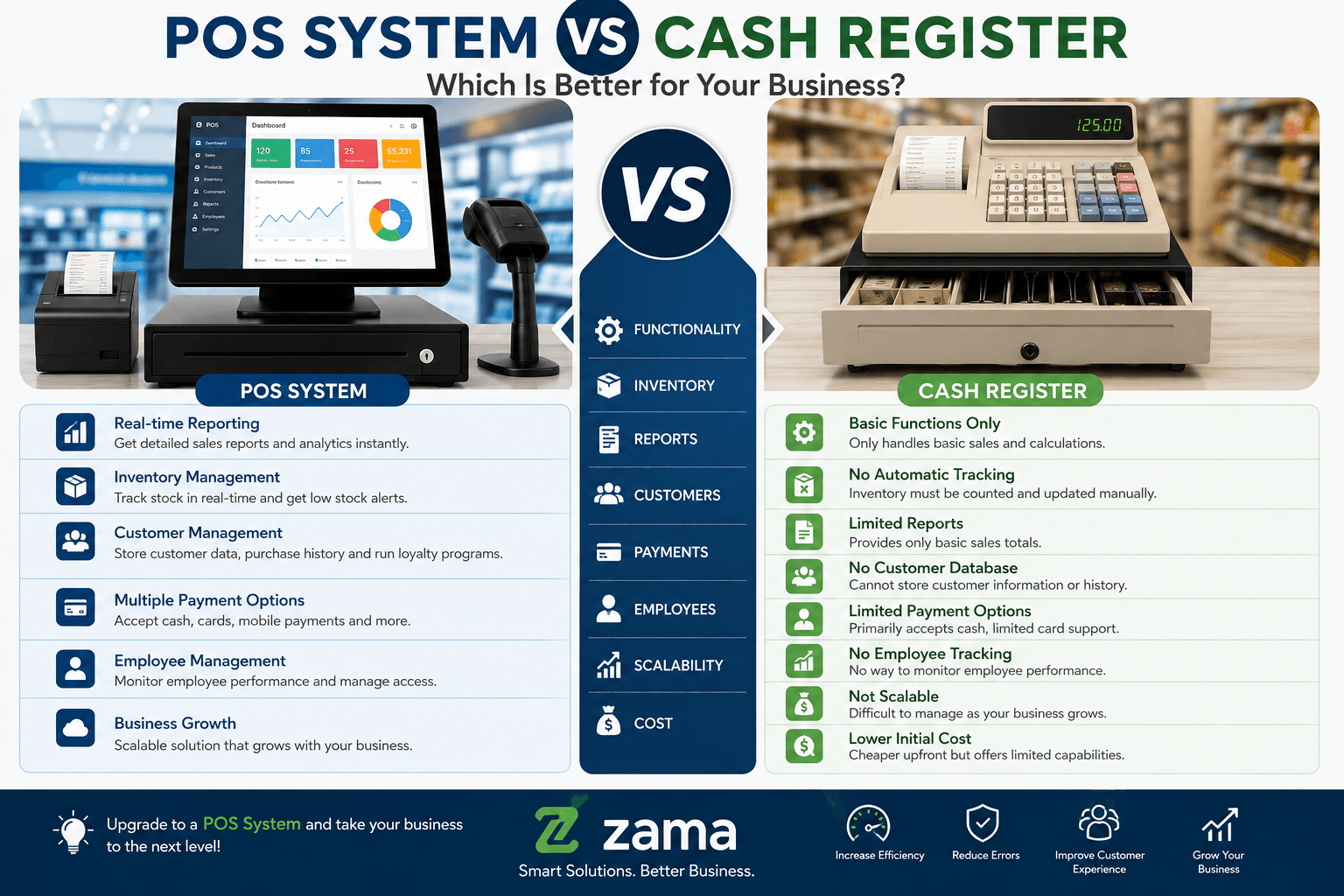
When starting or upgrading a business, one of the most important decisions is choosing the right sales management solution. Many business owners compare POS System vs Cash Register to determine which option best suits their needs. While both systems help businesses process customer payments, they differ significantly in features, functionality, reporting, and long-term value.
Understanding POS System vs Cash Register is essential because your choice directly affects customer experience, inventory management, financial reporting, employee productivity, and overall business growth. A cash register may be sufficient for very small businesses with basic needs, but modern businesses often require more advanced tools to stay competitive.
Whether you own a retail shop, supermarket, pharmacy, restaurant, electronics store, boutique, hardware shop, or wholesale business, learning about POS System vs Cash Register will help you make an informed investment.
In this comprehensive guide, we will compare both solutions in detail, discuss their advantages and disadvantages, explain which businesses benefit from each option, and help you choose the best system for your operations.
What Is a Cash Register?
A cash register is a traditional machine used for recording sales transactions and storing cash securely. It has been used by businesses for decades and remains common in small shops.
Basic functions include:
- Calculating totals
- Opening the cash drawer
- Printing receipts
- Recording sales
- Storing cash safely
Most traditional cash registers perform only essential sales functions and require manual record keeping for inventory, accounting, and business analysis.
When discussing POS System vs Cash Register, the cash register represents the simpler and less expensive option.
What Is a POS System?
A Point of Sale (POS) System is a complete business management solution that combines hardware and software to automate daily operations.
A modern POS system includes:
- Computer or touchscreen terminal
- Barcode scanner
- Receipt printer
- Cash drawer
- Inventory management
- Customer database
- Sales reporting
- Employee management
- Payment processing
- Accounting integration
- Mobile payment support
Unlike traditional cash registers, POS systems collect and analyze business data in real time.
This difference makes POS System vs Cash Register one of the most important technology decisions for growing businesses.
POS System vs Cash Register: Major Differences
1. Inventory Management
One of the biggest differences in POS System vs Cash Register is inventory management.
Cash Register
Traditional cash registers do not automatically track inventory.
Employees must:
- Count stock manually
- Update inventory by hand
- Monitor product shortages manually
This process consumes time and increases the likelihood of errors.
POS System
A POS system automatically updates inventory after every sale.
Features include:
- Real-time stock updates
- Low stock alerts
- Product categorization
- Barcode management
- Supplier tracking
- Purchase order management
Businesses always know exactly what products are available.
Winner: POS System
2. Sales Reporting
Reporting is another major factor when comparing POS System vs Cash Register.
Cash Register
Reports are usually limited to:
- Daily sales totals
- Basic transaction summaries
Business owners often calculate profits manually.
POS System
Modern POS software generates detailed reports such as:
- Daily sales
- Weekly sales
- Monthly revenue
- Best-selling products
- Slow-moving inventory
- Profit margins
- Customer spending
- Sales by employee
- Payment methods
- Branch performance
These reports help businesses make informed decisions quickly.
Winner: POS System
3. Customer Management
Customer relationships are critical for business growth.
Cash Register
Cash registers generally do not store customer information.
There is no support for:
- Customer profiles
- Loyalty programs
- Purchase history
- Marketing campaigns
POS System
POS software allows businesses to manage customer relationships effectively through:
- Customer database
- Purchase history
- Loyalty rewards
- SMS promotions
- Email marketing
- Personalized discounts
This capability significantly enhances customer retention.
When evaluating POS System vs Cash Register, businesses focused on repeat customers will benefit greatly from a POS system.
4. Employee Management
Managing staff becomes easier with a POS solution.
Cash Register
Traditional cash registers offer little to no employee tracking.
Owners often rely on manual records.
POS System
Advanced POS systems include:
- Employee login accounts
- Sales tracking per cashier
- Shift management
- Attendance monitoring
- Performance reports
- Permission levels
Managers can easily monitor productivity and reduce fraud.
Winner: POS System
5. Speed of Transactions
Customer satisfaction depends on quick service.
Cash Register
Cash registers process simple transactions efficiently but become slower when handling:
- Product lookups
- Discounts
- Promotions
- Multiple payment methods
POS System
POS systems streamline checkout using:
- Barcode scanning
- Touchscreen interface
- Automatic calculations
- Digital receipts
- Multiple payment options
Faster service improves customer experience and reduces queues.
6. Payment Methods
Today’s customers expect flexibility.
Cash Register
Most traditional cash registers primarily handle cash payments.
Some support basic card terminals through external devices.
POS System
Modern POS systems support:
- Cash
- Credit cards
- Debit cards
- Mobile money
- Contactless payments
- Digital wallets
- Gift cards
- Store credit
This flexibility improves convenience for customers.
7. Business Growth
Scalability is another important consideration in POS System vs Cash Register.
Cash Register
Cash registers become limiting as businesses expand.
Challenges include:
- Manual inventory
- Limited reporting
- Difficult branch management
- No centralized data
POS System
POS software grows alongside your business by supporting:
- Multiple branches
- Cloud synchronization
- Centralized reporting
- Remote monitoring
- Multi-user access
- Franchise management
Growing businesses benefit significantly from these features.
Advantages of Using a POS System
Businesses increasingly choose POS systems because they provide:
- Faster sales processing
- Real-time inventory updates
- Better customer management
- Employee accountability
- Detailed reporting
- Improved financial accuracy
- Multi-location management
- Cloud backup
- Business analytics
- Higher operational efficiency
These advantages explain why the comparison of POS System vs Cash Register increasingly favors POS technology.
Advantages of Using a Cash Register
Despite its limitations, a cash register still offers several benefits:
- Lower purchase cost
- Simple operation
- Minimal training required
- Reliable basic transactions
- Low maintenance
- Suitable for very small businesses
For businesses with limited budgets and straightforward operations, a cash register can still be a practical option.
Disadvantages of a Cash Register
Although a cash register is affordable, it has several limitations that become more noticeable as a business grows. Understanding these drawbacks is essential when comparing POS System vs Cash Register.
1. Limited Reporting
Cash registers generally provide only basic sales totals. They cannot generate detailed reports on:
- Best-selling products
- Slow-moving inventory
- Employee performance
- Profit margins
- Customer purchasing trends
Without these insights, business owners often make decisions based on guesswork rather than data.
2. Manual Inventory Tracking
Since most cash registers do not automatically update inventory, employees must manually count stock and record changes. This increases the chances of:
- Stock shortages
- Overstocking
- Human errors
- Lost sales
3. No Customer Database
Traditional cash registers cannot store customer information, making it difficult to:
- Reward loyal customers
- Send promotions
- Track purchase history
- Build long-term relationships
4. Difficult Business Expansion
Managing multiple branches with cash registers is challenging because each location operates independently. Owners often have to travel between stores to collect reports.
5. Higher Risk of Fraud
Without employee tracking and audit logs, identifying suspicious transactions becomes difficult. This can increase losses due to theft or unauthorized discounts.
Disadvantages of a POS System
While a POS system offers many benefits, it also has a few disadvantages.
Higher Initial Cost
Compared to a cash register, a POS system usually requires a larger upfront investment in hardware and software.
Staff Training
Employees may need training to use all the available features effectively. Fortunately, most modern systems are designed with user-friendly interfaces.
Internet Dependency (Cloud-Based Systems)
Some cloud POS systems require internet connectivity for real-time synchronization. However, many continue processing sales offline and sync data once the connection is restored.
Even with these considerations, the long-term benefits often outweigh the initial investment, making POS System vs Cash Register an easy decision for growing businesses.
Industries That Benefit Most from a POS System
The comparison of POS System vs Cash Register varies depending on the type of business.
Retail Stores
Retail businesses benefit from:
- Barcode scanning
- Stock control
- Customer loyalty programs
- Discount management
- Sales reports
Restaurants
Restaurants use POS systems for:
- Table management
- Kitchen order printing
- Waiter performance tracking
- Split billing
- Online food ordering
Supermarkets
Large supermarkets require:
- Fast checkout
- Inventory automation
- Supplier management
- Promotions
- Barcode integration
Pharmacies
Pharmacies benefit through:
- Medicine inventory
- Batch tracking
- Expiry date monitoring
- Prescription records
Electronics Stores
Electronics retailers use POS systems to:
- Track serial numbers
- Manage warranties
- Process returns
- Monitor supplier purchases
Hardware Stores
Hardware businesses often have thousands of products. A POS system simplifies:
- Inventory tracking
- Price management
- Customer quotations
- Purchase orders
Which Businesses Can Still Use a Cash Register?
Although modern businesses increasingly prefer POS systems, some businesses may still operate efficiently with cash registers.
Examples include:
- Small kiosks
- Temporary market stalls
- Roadside vendors
- Small fruit shops
- Seasonal businesses
These businesses typically process fewer transactions and have simple operational needs.
Cost Comparison: POS System vs Cash Register
When evaluating POS System vs Cash Register, cost is an important factor.
Cash Register Costs
Typical expenses include:
- Initial purchase
- Receipt paper
- Occasional maintenance
Operating costs remain relatively low because the machine performs only basic functions.
POS System Costs
A POS system may include:
- POS software
- Computer or touchscreen terminal
- Barcode scanner
- Receipt printer
- Cash drawer
- Software updates
- Technical support
- Cloud storage
While the upfront cost is higher, businesses often recover the investment through improved efficiency, better inventory control, and increased sales.
Security Comparison
Security is another major difference in POS System vs Cash Register.
Cash Register Security
Security features are generally limited to:
- Lockable cash drawer
- Manual transaction records
If receipts are lost or records are damaged, recovering transaction history can be difficult.
POS System Security
Modern POS systems provide:
- User accounts
- Password protection
- Audit trails
- Data backups
- Cloud security
- Permission-based access
- Encrypted payment processing
These features help protect both business data and customer information.
Real Business Case Study
Case Study: Growing Retail Store
A retail shop started operations using a traditional cash register. Initially, the system met their needs because daily sales were low.
As the business expanded, several challenges emerged:
- Inventory shortages
- Pricing inconsistencies
- Long checkout queues
- Difficulty preparing financial reports
- Frequent stock-counting errors
The owner upgraded to a modern POS system.
Within six months, the business experienced:
- Faster checkout times
- Better inventory accuracy
- Reduced stock losses
- Improved customer satisfaction
- Easier financial reporting
- Higher profitability
This example demonstrates why many businesses comparing POS System vs Cash Register eventually choose a POS solution.
Customer Testimonials
Retail Shop Owner
“After switching from a cash register to a POS system, we immediately noticed better stock control and much faster customer service. Our reports now help us make smarter business decisions.”
Restaurant Manager
“Managing orders became much easier. The kitchen receives orders instantly, billing is faster, and customers spend less time waiting.”
Pharmacy Owner
“Inventory management has completely changed. We can now track medicine availability and expiry dates automatically.”
Why Businesses Are Switching to POS Systems
Across many industries, businesses are replacing traditional cash registers because they need technology that supports growth.
A POS system offers:
- Real-time reporting
- Better inventory control
- Improved customer service
- Employee accountability
- Faster transactions
- Cloud accessibility
- Business intelligence
- Multi-branch management
- Flexible payment options
- Higher efficiency
These advantages continue to make POS System vs Cash Register a relevant comparison for businesses planning long-term success.
Service Description
If your business is considering upgrading from a traditional cash register, Zama provides modern POS solutions tailored to businesses of all sizes.
Our POS solutions include:
- Retail POS software
- Restaurant POS systems
- Inventory management
- Barcode integration
- Customer loyalty management
- Sales analytics
- Employee management
- Multi-branch support
- Cloud-based reporting
- Technical support and training
Whether you operate a single shop or multiple branches, we help you implement a POS solution that improves efficiency and drives business growth.
Frequently Asked Questions (FAQs)
1. What is the main difference between a POS System and a Cash Register?
The biggest difference in POS System vs Cash Register is functionality. A cash register mainly records sales and stores cash, while a POS system manages sales, inventory, customers, employees, reports, and payments in one integrated platform.
2. Which is better for a small business?
It depends on your business goals. If you only need to process a few cash transactions daily, a cash register may be enough. However, if you want to track inventory, generate reports, improve customer service, and grow your business, a POS system is the better choice. This is why many entrepreneurs researching POS System vs Cash Register ultimately choose a POS solution.
3. Can a POS System work without the internet?
Yes. Many modern POS systems have an offline mode that allows you to continue processing sales. Once the internet connection is restored, the data automatically synchronizes with the cloud.
4. Is a POS System more secure than a Cash Register?
Generally, yes. POS systems include user authentication, encrypted payment processing, audit logs, cloud backups, and role-based permissions, making them far more secure than traditional cash registers.
5. Can a POS System manage multiple branches?
Yes. One of the biggest advantages in POS System vs Cash Register is that a POS system can manage multiple stores from one dashboard. Business owners can monitor sales, inventory, and employee performance across all branches in real time.
6. Does a POS System support M-Pesa and card payments?
Yes. Most modern POS systems support multiple payment methods, including:
- Cash
- Debit cards
- Credit cards
- Mobile money such as M-Pesa
- Contactless payments
- Digital wallets
7. Is a Cash Register becoming outdated?
While cash registers are still used in some small businesses, many companies are replacing them with POS systems because they offer better automation, reporting, inventory management, and scalability.
Final Verdict: POS System vs Cash Register
When comparing POS System vs Cash Register, the right choice depends on your business needs, budget, and future plans.
Choose a Cash Register if you:
- Run a very small business
- Process only basic cash transactions
- Have limited reporting requirements
- Do not need inventory management
- Are working with a very tight budget
Choose a POS System if you:
- Want to grow your business
- Need real-time inventory tracking
- Require detailed sales reports
- Manage multiple employees
- Operate more than one branch
- Want to improve customer service
- Accept multiple payment methods
- Need business insights to make informed decisions
For most modern businesses, the comparison of POS System vs Cash Register clearly favors a POS system because it delivers greater efficiency, better control, and the tools needed to compete in today’s digital marketplace.
Why Choose Zama for Your POS Solution?
At Zama, we help businesses modernize their operations with reliable and user-friendly POS solutions designed to improve productivity and profitability.
Our POS Solutions Include:
- Retail POS Software
- Restaurant POS Systems
- Inventory Management
- Barcode Integration
- Customer Loyalty Programs
- Employee Management
- Sales Analytics and Reporting
- Multi-Branch Management
- Cloud-Based Access
- M-Pesa and Card Payment Integration
- Training and Technical Support
- Custom POS Development
Whether you’re replacing an old cash register or launching a new business, our team can help you implement a POS system that fits your unique requirements.
Call to Action
Ready to upgrade your business?
Stop relying on outdated systems and discover how a modern POS solution can transform your daily operations. From faster checkouts and accurate inventory tracking to insightful reports and better customer experiences, the right POS system can help your business operate more efficiently and grow with confidence.
Contact Zama today to schedule a free consultation or request a personalized demonstration. Our experts will help you choose the ideal POS solution for your business size, industry, and budget.
Conclusion
The debate over POS System vs Cash Register is no longer just about processing sales—it’s about choosing the right technology to support your business’s future. While cash registers remain useful for businesses with very basic requirements, they lack the advanced features that today’s competitive market demands.
A modern POS system provides real-time inventory management, detailed reporting, customer relationship tools, employee tracking, secure payment processing, and the flexibility to scale as your business grows. These capabilities save time, reduce errors, improve decision-making, and create a better customer experience.
If you’re evaluating POS System vs Cash Register, think beyond today’s needs. Consider where you want your business to be in the next five years. Investing in a POS system today can position your business for sustainable growth, increased efficiency, and higher profitability.
No matter your industry—retail, hospitality, pharmacy, supermarket, electronics, or wholesale—a POS system offers the technology needed to stay competitive. When comparing POS System vs Cash Register, the smarter long-term investment is clear: a POS system equips your business with the tools to succeed in an increasingly digital world.