
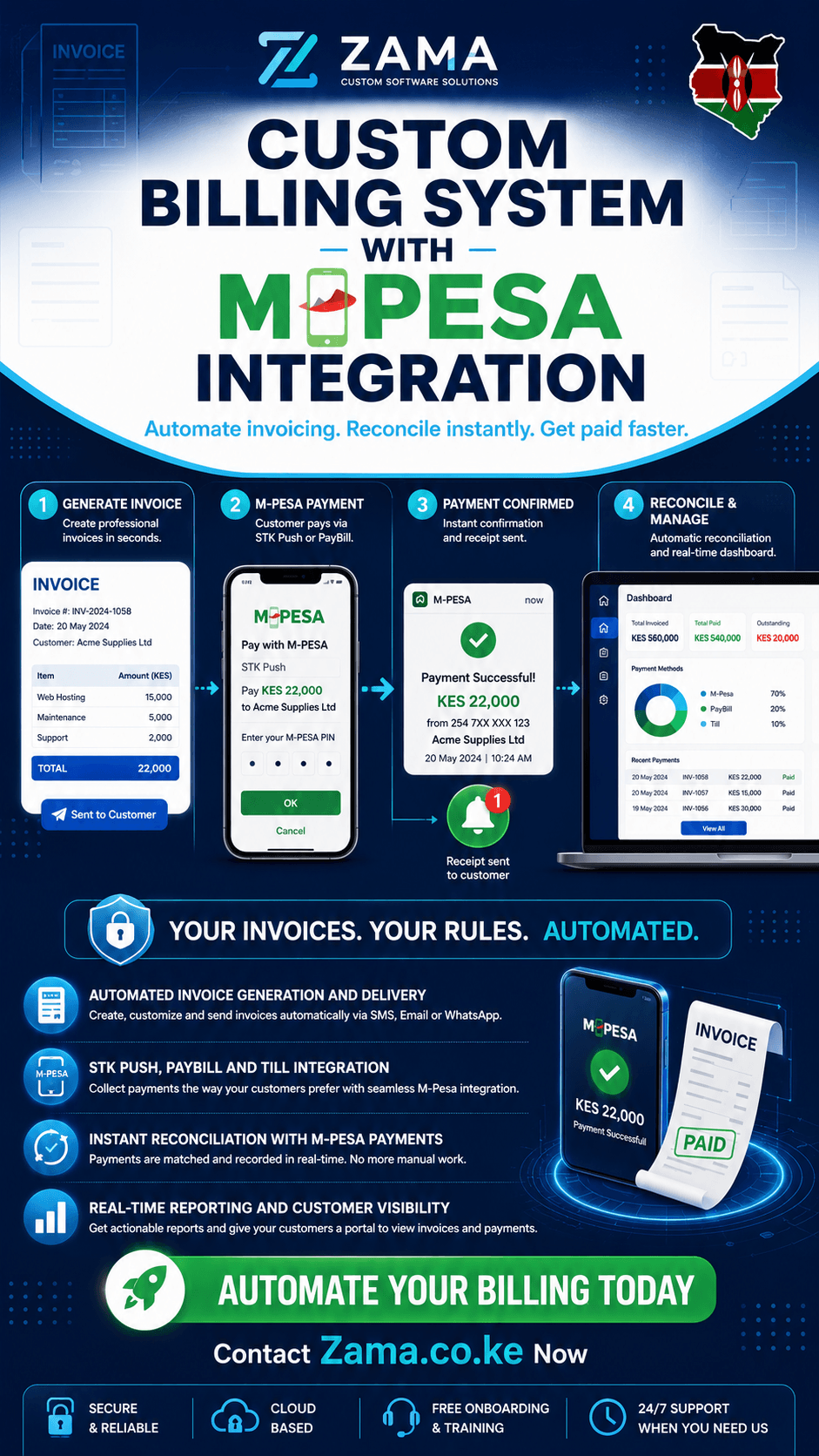
Custom billing system with M-Pesa integration is a question that every business owner, finance manager, and operations director in Kenya must answer in 2026. With mobile money transactions in Kenya surpassing 2 trillion shillings annually and businesses increasingly seeking to automate their billing processes, the ability to seamlessly integrate M-Pesa payments with custom invoicing systems has become a competitive necessity. At zama.co.ke, we’ve helped numerous businesses across Kenya build custom billing systems with M-Pesa integration that automate invoicing, streamline payment collection, and eliminate manual reconciliation headaches. This comprehensive guide explores custom billing system with M-Pesa integration, from understanding the core components to implementing solutions that transform how businesses bill and collect payments.
Understanding Custom Billing Systems with M-Pesa Integration
Before diving into custom billing system with M-Pesa integration, it’s essential to understand what this actually means. A custom billing system is a tailored software solution designed to handle the specific invoicing, payment tracking, and financial reconciliation needs of a particular business. Unlike off-the-shelf solutions that force businesses to adapt to generic workflows, custom billing systems are built around how the business actually operates.
M-Pesa integration refers to connecting this billing system with Safaricom’s mobile money platform through the Daraja API, enabling automated payment collection, reconciliation, and confirmation. This integration is what makes custom billing system with M-Pesa integration so powerful for Kenyan businesses—it transforms the billing process from a manual, error-prone chore into an automated, efficient workflow.
When considering custom billing system with M-Pesa integration, businesses typically need to handle:
Automated Invoice Generation: Creating and sending invoices automatically based on sales, subscriptions, or recurring charges.
Payment Processing: Collecting payments through M-Pesa via STK Push, PayBill, or Till Number.
Automated Reconciliation: Matching incoming M-Pesa payments with outstanding invoices without manual effort.
Payment Confirmation: Notifying customers when payments are received and updating account statuses.
Financial Reporting: Providing real-time visibility into billing status, collections, and revenue.
Why Kenyan Businesses Need Custom Billing Systems
When evaluating custom billing system with M-Pesa integration, consider the challenges that drive businesses to seek custom solutions:
Manual Billing Is Costly
The average SME in Nairobi spends significant amounts monthly on manual billing processes—creating invoices, sending them via email or WhatsApp, tracking who has paid, reconciling M-Pesa payments, and following up on overdue accounts. This manual effort consumes staff time that could be focused on revenue-generating activities.
Reconciliation Is a Nightmare
Without a custom billing system with M-Pesa integration, businesses face constant reconciliation challenges. M-Pesa payments arrive with transaction codes that must be manually matched to invoices. Customers often make partial payments or pay without referencing their invoice numbers. Finance teams spend hours every week trying to match payments to accounts.
Errors Are Expensive
Manual billing processes are prone to errors—incorrect amounts, wrong customer details, missed payments, duplicate invoices, and incorrect reconciliations. These errors result in lost revenue, customer disputes, and audit issues.
Customer Expectations Are Rising
Customers now expect seamless digital experiences. They want to receive invoices instantly, pay with one click, and receive immediate confirmation of payment. Businesses without automated billing systems risk losing customers to competitors who provide better experiences.
Scaling Is Impossible
Manual billing processes do not scale. As customer volumes grow, the billing workload increases proportionally. A business that can handle 100 customers manually may struggle with 500 and completely break down at 1,000. This is the real power of custom billing system with M-Pesa integration—it enables scaling without proportional increases in billing staff.
Key Components of a Custom Billing System with M-Pesa Integration
When evaluating custom billing system with M-Pesa integration, several components work together:
Invoice Generation Engine
The invoice generation engine creates professional, KRA-compliant invoices automatically. Key features include:
Automated Invoice Creation: Invoices are generated automatically based on sales, subscriptions, or recurring billing cycles.
Customizable Templates: Invoice templates match the business’s branding and include all required legal information.
Multiple Invoice Types: Support for pro-forma invoices, tax invoices, credit notes, and recurring invoices.
Sequential Numbering: Automatic assignment of unique invoice numbers for audit purposes.
KRA eTIMS Compliance: Invoices generated in formats that comply with KRA’s electronic tax invoice requirements.
M-Pesa Payment Gateway
The M-Pesa payment gateway connects the billing system to Safaricom’s Daraja API. Essential capabilities include:
STK Push Integration: Send payment prompts directly to customers’ phones, allowing them to authorize payments with their PIN.
PayBill Integration: Support for customers paying via PayBill numbers with automatic reconciliation.
Till Number Integration: Support for payments made through Till numbers.
Callback Handling: Process the callbacks from M-Pesa when payments are completed or fail.
Transaction Status Queries: Check the status of pending transactions.
Automated Reconciliation Engine
The reconciliation engine is the heart of any custom billing system with M-Pesa integration. It automatically matches incoming payments with outstanding invoices:
Payment Matching: Incoming M-Pesa payments are matched to invoices by account reference, customer phone number, or other identifiers.
Partial Payment Handling: The system handles partial payments, updating invoice balances accordingly.
Unmatched Payment Queues: Payments that cannot be automatically matched are queued for manual review.
Real-Time Balance Updates: Customer account balances update in real-time as payments are received.
Exception Handling: Processes for handling refunds, chargebacks, and payment disputes.
Payment-Triggered Workflows
A powerful custom billing system with M-Pesa integration triggers actions based on payment events:
Confirmation Notifications: Send SMS or email confirmations when payments are received.
Service Activation: Automatically activate or deactivate services based on payment status.
Account Status Updates: Update customer account statuses (active, suspended, overdue) based on payment history.
Receipt Generation: Generate and send payment receipts automatically.
Accounting Integration: Update accounting systems or ledgers automatically.
Reporting and Dashboard
Comprehensive reporting provides visibility into billing performance:
Aged Debtor Reports: Track overdue invoices and follow-up accordingly.
Collection Reports: Monitor collection rates and identify trends.
Revenue Dashboards: Real-time visibility into revenue by customer, product, or period.
Payment Reconciliation Reports: Match payments to invoices for audit purposes.
Customer Payment History: Complete view of each customer’s billing history.
Implementation Approaches
Option 1: Using M-Pesa SDKs
For businesses building custom billing systems with M-Pesa integration, SDKs simplify the implementation:
Daraja-v3 Python SDK: This production-ready Python SDK handles token caching, automatic phone number normalization, and provides typed results. It supports STK Push, STK Query, B2C, C2B Register, Account Balance, and webhook parsing . Key features include:
Token caching to avoid burning requests on expired tokens
Composable exceptions for granular error handling
Automatic phone number normalization
Webhook parsing for callback handling
Node.js Daraja SDK: The npm package
daraja-sdk
provides convenient methods for STK Push, C2B, B2C, transaction status queries, and balance inquiries .
PHP Safaricom Daraja SDK: The
statum/safaricom-daraja-sdk
provides a modern, type-safe SDK supporting PHP 8.2+ with automatic OAuth token lifecycle management and token caching .
Option 2: Using Workflow Automation Platforms
For businesses that want to build custom billing system with M-Pesa integration without extensive custom coding, workflow automation platforms offer alternatives:
n8n: An open-source workflow automation tool with HTTP request nodes that can connect to M-Pesa APIs and trigger billing actions.
Make (formerly Integromat): Supports HTTP requests and can integrate M-Pesa APIs with billing applications.
Zapier: Webhook-based workflows can connect M-Pesa payment notifications to billing systems.
Option 3: Building from Scratch
For businesses with unique requirements, custom development offers the most flexibility for custom billing system with M-Pesa integration:
API Development: Build custom API endpoints that handle invoice generation, M-Pesa integration, reconciliation, and reporting.
Database Design: Design databases that support complex billing relationships, payment tracking, and reconciliation.
Webhook Handlers: Implement webhook endpoints that receive payment notifications from M-Pesa and trigger billing updates.
Background Workers: Use cron jobs or queue workers for scheduled billing and payment verification.
Payment Flow in a Custom Billing System with M-Pesa Integration
STK Push Flow
The STK Push flow is the most common payment method for custom billing system with M-Pesa integration:
Step 1: The billing system generates an invoice and sends an STK Push payment prompt to the customer’s phone. The prompt includes the amount, business name, and payment reference.
Step 2: The customer opens their M-Pesa, sees the payment prompt, and enters their PIN to authorize the payment.
Step 3: M-Pesa processes the payment and sends a callback to the billing system’s callback URL.
Step 4: The callback handler validates the payment, reconciles it against the invoice, updates the customer’s account status, and sends confirmation notifications.
Step 5: The billing system updates the invoice status to “Paid” and triggers any payment-dependent workflows.
PayBill Flow
For customers paying via PayBill, the flow is slightly different:
Step 1: The customer initiates payment by selecting “Pay Bill” in M-Pesa, entering the business PayBill number, the account reference (invoice number), and the amount.
Step 2: M-Pesa processes the payment and sends a callback to the billing system.
Step 3: The callback handler matches the payment to the invoice using the account reference and updates the invoice status.
Step 4: The billing system sends payment confirmation and updates the customer account.
Reconciliation Flow
The reconciliation engine in a custom billing system with M-Pesa integration handles:
Automatic Matching: Incoming payments are matched to invoices based on reference numbers, customer phone numbers, or other identifiers.
Partial Payments: When a payment does not match an invoice exactly, the system applies it proportionally and tracks remaining balances.
Unmatched Payments: Payments that cannot be automatically matched are placed in an exception queue for manual review.
Overpayments: The system tracks overpayments as credits on customer accounts.
Discrepancy Handling: Processes for resolving payment discrepancies, refunds, and disputes.
Security and Compliance Considerations
When implementing custom billing system with M-Pesa integration, security and compliance are paramount:
Credential Security
Store API keys, passkeys, and security credentials in environment variables
Never hardcode credentials in source code
Implement proper access controls for billing system users
Rotate credentials regularly
Payment Data Security
Never store customer payment PINs or sensitive financial data
Encrypt all sensitive data in transit and at rest
Use secure HTTPS connections for all API communications
Implement proper logging without exposing sensitive information
KRA eTIMS Compliance
Generate invoices in KRA-compliant formats
Include all required tax information on invoices
Maintain proper audit trails for all transactions
Support electronic tax invoice requirements
Data Protection Act Compliance
Obtain consent for storing customer billing data
Implement data minimization principles
Provide customers with access to their billing data
Maintain proper data security measures
The Zama.co.ke Approach
When considering custom billing system with M-Pesa integration, zama.co.ke follows a structured approach:
Billing Workflow Discovery
We define your billing processes: invoice generation, payment methods, reconciliation procedures, reporting needs, and exception handling.
System Design
We design the billing system architecture, including invoice templates, payment processing flows, reconciliation engine, and reporting dashboards.
Integration Build
We implement the M-Pesa integration using the appropriate SDKs, implement callback handling, and build the reconciliation engine.
Testing and Validation
We test all billing flows, payment scenarios, reconciliation cases, and exception handling before launch.
Post-Launch Support
We remain available to maintain, refine, and extend the billing system as your business evolves.
Custom billing system with M-Pesa integration is essential for any Kenyan business seeking to automate invoicing, streamline payment collection, and eliminate manual reconciliation. From automated invoice generation and STK Push payments to real-time reconciliation and comprehensive reporting, the right billing system transforms how businesses manage their finances.
At zama.co.ke, we’ve helped businesses across Kenya build custom billing systems with M-Pesa integration that deliver measurable results. Our approach ensures you get exactly what your business needs—nothing more, nothing less.
Contact zama.co.ke today and let us help you build a custom billing system with M-Pesa integration that transforms your business operations.