
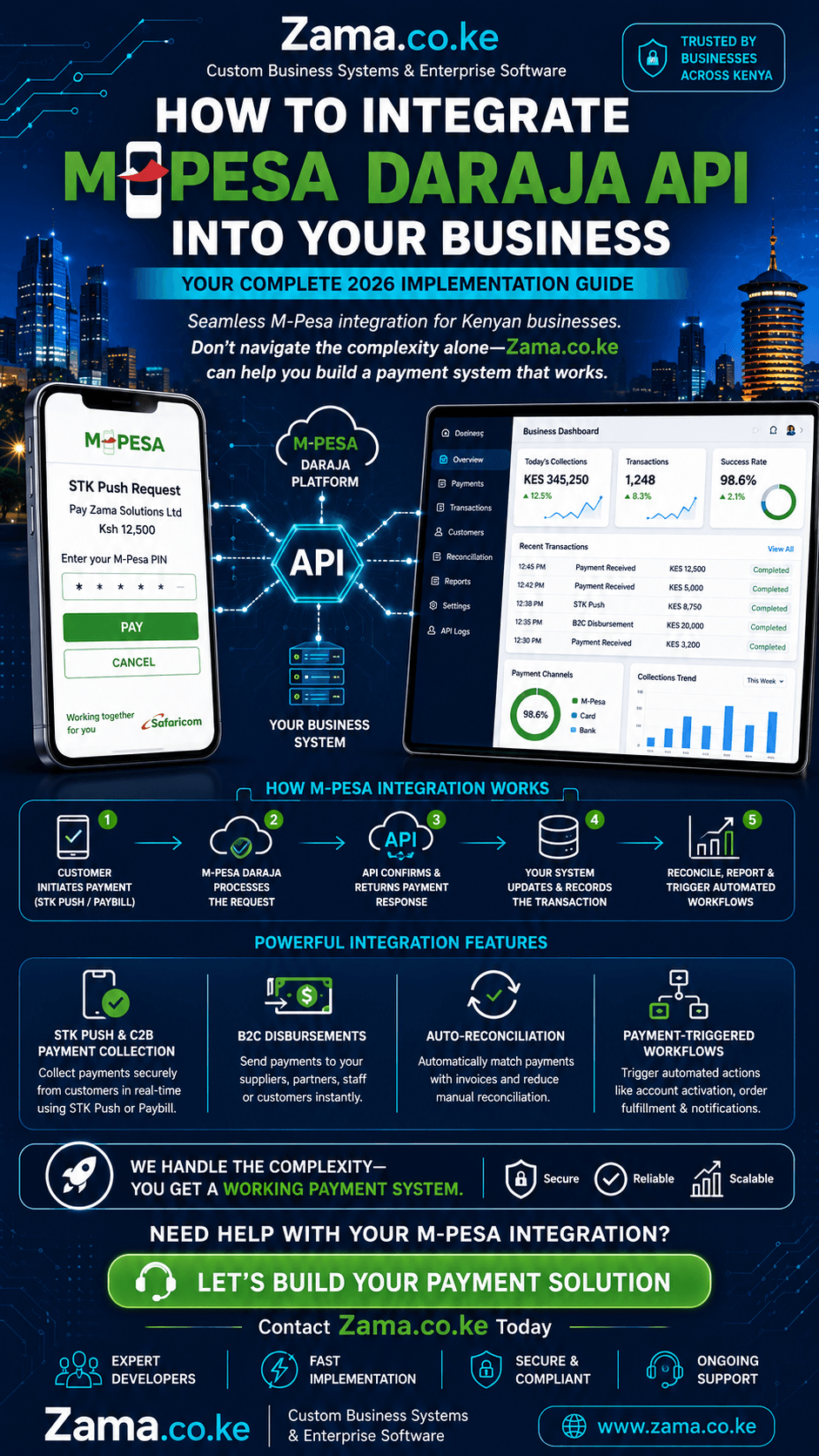
How to integrate M-Pesa Daraja API into your business system is a question that every Kenyan business owner, developer, and entrepreneur must answer in 2026. With over 60 million active M-Pesa users across East Africa, the ability to seamlessly connect your business platform to Safaricom’s mobile money ecosystem is no longer optional—it’s essential. At zama.co.ke, we’ve helped hundreds of businesses across Kenya build robust payment integrations that streamline operations, reduce manual errors, and enhance customer satisfaction. This comprehensive guide explores everything you need to know about how to integrate M-Pesa Daraja API into your business system, from understanding the ecosystem to navigating the complexities of implementation.
Understanding the Daraja API Ecosystem
Before diving into how to integrate M-Pesa Daraja API into your business system, it’s crucial to understand what the Daraja API offers. Safaricom’s Daraja platform provides a comprehensive set of APIs that enable businesses to leverage M-Pesa’s payment infrastructure. The APIs include:
STK Push (Lipa Na M-Pesa Online): Initiates payment prompts directly on customers’ phones
C2B (Customer to Business): Processes payments from customers to your business via PayBill or Till numbers
B2C (Business to Customer): Enables businesses to send money to customers
B2B (Business to Business): Facilitates transactions between business accounts
Transaction Status Query: Checks the status of any transaction
Account Balance Inquiry: Retrieves your M-Pesa business account balance
Reversal API: Reverses erroneous transactions
Understanding these capabilities is the first step in learning how to integrate M-Pesa Daraja API into your business system effectively.
Prerequisites for Integration
To successfully learn how to integrate M-Pesa Daraja API into your business system, you’ll need to gather the following:
1. Safaricom Developer Account
Start by creating a developer account on the Safaricom Developer Portal at developer.safaricom.co.ke. This gives you access to the Daraja API documentation and test credentials.
2. API Credentials
Once you’ve registered as a developer, you’ll need to create an application in the portal. This generates your:
Consumer Key: Identifies your application
Consumer Secret: Used for authentication
3. Business Shortcode
You need a registered PayBill or Till number associated with your M-Pesa business account. For testing, Safaricom provides a sandbox shortcode (174379).
4. Passkey
For STK Push transactions, you’ll need a passkey generated from your Daraja portal application.
5. Callback URLs
You must configure URLs that M-Pesa will use to send transaction notifications. For testing, tools like ngrok can expose your local development environment.
The Implementation Journey
Now let’s explore what’s involved in how to integrate M-Pesa Daraja API into your business system through a structured approach.
Authentication and Token Generation
The first technical step in how to integrate M-Pesa Daraja API into your business system is setting up authentication. Every API call to Safaricom requires an access token generated through OAuth 2.0 client credentials flow. The system must:
Generate a base64 encoded string of your consumer key and secret
Send a request to Safaricom’s authentication endpoint
Receive and store the access token for subsequent API calls
Handle token refresh when expired
This authentication layer is fundamental to how to integrate M-Pesa Daraja API into your business system correctly.
STK Push Implementation
STK Push is the most common integration method. Understanding how to implement it is central to how to integrate M-Pesa Daraja API into your business system. The STK Push flow works as follows:
Your system initiates the API request with required parameters
The API validates the request and sends an acknowledgment
An STK push trigger is sent to the customer’s M-Pesa registered number
The customer confirms by entering their PIN
M-Pesa processes the payment and sends results via callback URL
The customer receives an SMS confirmation
When implementing how to integrate M-Pesa Daraja API into your business system for STK Push, you need to handle:
Business Shortcode: Your registered PayBill number
Transaction Type: CustomerPayBillOnline for PayBill
Amount: The transaction amount
Phone Number: The customer’s M-Pesa registered number
Callback URL: Where M-Pesa sends transaction results
Account Reference: Your invoice or order reference
Transaction Description: Brief description of the payment
C2B Integration
For businesses collecting payments via PayBill, C2B integration is essential in how to integrate M-Pesa Daraja API into your business system. The C2B flow includes:
Register URLs:
Your system must register confirmation and validation URLs with Safaricom. The confirmation URL receives payment notifications automatically when customers pay your PayBill or Till number. This allows for real-time invoice reconciliation and order fulfillment.
Validation URL:
This URL receives validation requests before payments are processed, allowing your system to verify the transaction.
When considering how to integrate M-Pesa Daraja API into your business system for C2B, you must handle:
Real-time payment notifications
Invoice matching by bill reference
Account balance updates
Customer notifications
Reconciliation processes
B2C for Disbursements
For businesses sending money to customers, B2C implementation is an important aspect of how to integrate M-Pesa Daraja API into your business system. B2C requires:
Initiator Name: The username of the API initiator
Security Credential: Encrypted password using Safaricom’s public certificate
Amount: The amount to send
Phone Number: The recipient’s phone number
Remarks: Reason for payment
Callback URL: Where results are sent
The B2C API requires additional security credentials, making it one of the more complex aspects of how to integrate M-Pesa Daraja API into your business system.
Transaction Status and Balance Queries
Understanding how to check transaction status and account balances is essential in how to integrate M-Pesa Daraja API into your business system. These queries allow your system to:
Verify transaction completion
Reconcile pending payments
Monitor account balances
Audit payment flows
Handle callback failures
Callback Handling
Understanding how to handle callbacks is critical in how to integrate M-Pesa Daraja API into your business system. M-Pesa sends transaction results to your configured callback URL. When implementing how to integrate M-Pesa Daraja API into your business system, ensure your callback endpoints are:
Publicly accessible (use ngrok for testing)
Idempotent (handle duplicate callbacks safely)
Secure (validate incoming requests)
Logged (for debugging and reconciliation)
Advanced Implementation Considerations
Reconciliation-Aware Integration
The most sophisticated aspect of how to integrate M-Pesa Daraja API into your business system is building reconciliation-aware payment processing. At zama.co.ke, we emphasize that payment integration must be workflow-aware and reconciliation-minded.
A reconciliation-aware integration:
Maps M-Pesa events to invoices and account records
Surfaces exceptions clearly for finance teams
Provides reliable reporting views of what has been paid
Handles unmatched events appropriately
This means when a customer pays, the system should automatically:
Match the payment to the correct invoice by bill reference or payer phone
Update account balances and statements
Trigger service workflows (access activation, order fulfillment)
Notify relevant teams
Multi-Process Deployments
For production environments with multiple processes or workers, how to integrate M-Pesa Daraja API into your business system must consider shared token caching. The system should:
Store access tokens in a shared cache
Implement atomic locks around cache misses
Handle token refresh gracefully
Avoid rate limiting issues
Payment-Triggered Workflows
One of the most powerful aspects of how to integrate M-Pesa Daraja API into your business system is enabling payment-triggered service workflows. A successful payment often needs to trigger another action such as:
Opening access to a service or facility
Scheduling service delivery
Confirming enrollment
Updating an internal queue
Sending notifications
Updating account status
By connecting payment events to the next business step, your system can act automatically and reduce the delay between collection and service delivery.
Internal Payment Monitoring Dashboards
Without internal visibility, operations teams cannot tell which transactions succeeded, which failed, and which need attention. When implementing how to integrate M-Pesa Daraja API into your business system, build dashboards that help teams monitor:
Payment activity in real-time
Failed transactions and exceptions
Reconciliation status
Customer payment patterns
Revenue trends
Security Best Practices
When learning how to integrate M-Pesa Daraja API into your business system, security must be a priority:
Never cache consumer secrets: Don’t store passkeys, initiator passwords, or security credentials in logs or caches
Use environment variables: Store credentials in environment variables, not in code
Validate callbacks: Ensure incoming callbacks are genuine M-Pesa notifications
Implement rate limiting: Protect your endpoints from abuse
Log securely: Redact sensitive information from logs
Use HTTPS: Always use secure connections
Technology Stack Considerations
When determining how to integrate M-Pesa Daraja API into your business system, your technology stack matters. Available options include:
PHP/Laravel
The
statum/safaricom-daraja-sdk
provides a modern, type-safe SDK supporting PHP 8.2+ with framework-agnostic core libraries and typed request/response DTOs. It handles automatic OAuth token lifecycle management, token caching, and one-time 401 token refresh.
Node.js
The
daraja-sdk
npm package provides convenient methods for STK Push, C2B, B2C, B2B, transaction status queries, and balance inquiries.
Python
The
daraja-v3
production Python SDK provides zero-dependency, type-annotated implementations with Stripe-quality error handling and automatic phone number normalization.
Other Platforms
Java: Spring Boot implementations available
Odoo:
pay_ke_mpesa_darajamodule availablen8n:
n8n-nodes-mpesa-darajafor workflow automation
Common Challenges and Solutions
Challenge 1: Callback Reliability
Problem: Callback URLs may not receive notifications due to network issues or server downtime.
Solution: Implement a transaction status query fallback. If a callback isn’t received within a reasonable timeframe, query the transaction status directly. This ensures your system can still update payment status even when callbacks fail.
Challenge 2: Reconciliation Errors
Problem: Payments don’t match invoices because of missing or incorrect references.
Solution: Build a robust reconciliation system with exception queues for unmatched payments. Implement automatic invoice matching by bill reference and payer phone.
Challenge 3: Phone Number Formats
Problem: Customers provide phone numbers in various formats (0712345678, 254712345678, +254712345678).
Solution: Normalize all phone numbers to the canonical
2547xxxxxxxx
or
2541xxxxxxxx
format that M-Pesa expects. This is a crucial step in how to integrate M-Pesa Daraja API into your business system reliably.
Challenge 4: Token Expiry
Problem: Access tokens expire and cause authentication failures.
Solution: Use SDKs that automatically handle token caching and refresh, or implement your own token management system.
Challenge 5: Testing in Production
Problem: Testing real transactions is expensive and risky.
Solution: Thoroughly test in the Safaricom sandbox environment before moving to production. Use the C2B simulation tool available at developer.safaricom.co.ke/test_credentials.
Challenge 6: Security Vulnerabilities
Problem: Improper credential storage or callback validation can expose your system.
Solution: Always use environment variables for credentials, validate incoming callbacks, and implement proper logging without exposing sensitive data.
Why Choose Zama.co.ke for Your Integration
When businesses ask how to integrate M-Pesa Daraja API into your business system, they choose zama.co.ke because:
Workflow-Aware Payment Integration
We treat M-Pesa as part of a broader business process so payment events connect cleanly to orders, accounts, reports, and internal actions. This means how to integrate M-Pesa Daraja API into your business system isn’t just about connecting to M-Pesa—it’s about transforming your entire payment workflow.
Reconciliation-Minded Delivery
Finance and operations need more than successful requests. They need clean transaction matching, exception visibility, and dependable reporting. When we help you understand how to integrate M-Pesa Daraja API into your business system, we build reconciliation into the foundation.
User and Admin Visibility
A good payment system gives clear feedback to customers and equally clear operational control to the internal team managing transactions. Our approach to how to integrate M-Pesa Daraja API into your business system ensures both perspectives are covered.
Support After Launch
Payment-driven systems need live reliability, and we remain available to maintain, troubleshoot, and improve the workflow over time. Your journey in how to integrate M-Pesa Daraja API into your business system doesn’t end at launch—it’s an ongoing partnership.
Local Expertise
We understand the Kenyan business landscape, regulatory requirements, and customer behavior patterns. This local knowledge is invaluable when determining how to integrate M-Pesa Daraja API into your business system effectively.
The Cost of Not Integrating
While businesses focus on the complexity of how to integrate M-Pesa Daraja API into your business system, the cost of not integrating is often higher:
Manual Reconciliation Costs
Without automated payment tracking, finance teams spend hours reconciling payments manually. This labor cost adds up quickly.
Customer Friction
Customers expect seamless digital payments. Without proper integration, you lose customers to competitors who offer better payment experiences.
Delayed Service Delivery
When payments aren’t confirmed automatically, service delivery is delayed. This impacts customer satisfaction and retention.
Reconciliation Errors
Manual processes lead to errors that can cost thousands in disputes, refunds, and lost revenue.
Limited Scalability
Without automated payment processing, your business can’t scale efficiently. Every new customer adds more manual work.
How to integrate M-Pesa Daraja API into your business system is a critical capability for any Kenyan business operating in 2026. From STK Push for e-commerce to C2B for PayBill collections, B2C for disbursements, and reconciliation-aware payment processing, the integration possibilities are vast.
At zama.co.ke, we’ve helped hundreds of businesses across Kenya build robust M-Pesa integrations that streamline operations, reduce manual errors, and enhance customer satisfaction. Our workflow-aware approach ensures that payment events connect cleanly to orders, accounts, reports, and internal actions—not just in isolation.
The complexity of how to integrate M-Pesa Daraja API into your business system shouldn’t hold you back. With the right partner and approach, you can build a payment system that scales with your business and delights your customers.
Don’t navigate the complexities of how to integrate M-Pesa Daraja API into your business system alone. Whether you’re starting from scratch or optimizing an existing integration, we have the expertise to guide you through every step of the journey.
Contact zama.co.ke today and let us help you build a seamless M-Pesa integration that transforms your business operations. Our team will work with you to understand your specific needs, design a solution that fits your workflow, and ensure your payment system is reliable, secure, and scalable.
The question isn’t whether you need to learn how to integrate M-Pesa Daraja API into your business system—it’s whether you’ll do it with the right partner. Choose Zama.co.ke for expertise, reliability, and results that matter.